Features of Timesheet Software

Explore what Timesheets.com HR Software offers — from day-to-day workflows to advanced capabilities.

5 features

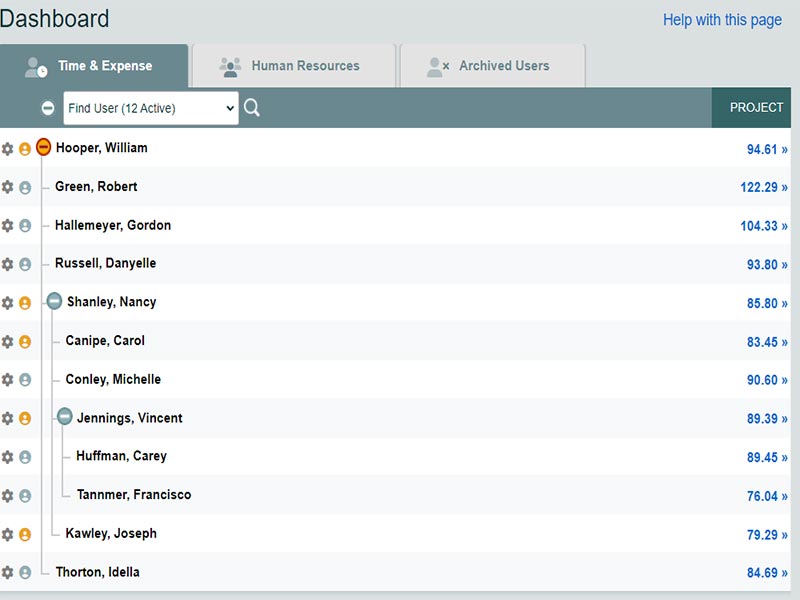
Hourly time tracking

Employee time is recorded for payroll and attendance. Some of the features provided by the platform include audit trails, photo timestamp tools, custom permissions and QuickBooks sync. Staff can clock hours from desktop or mobile.

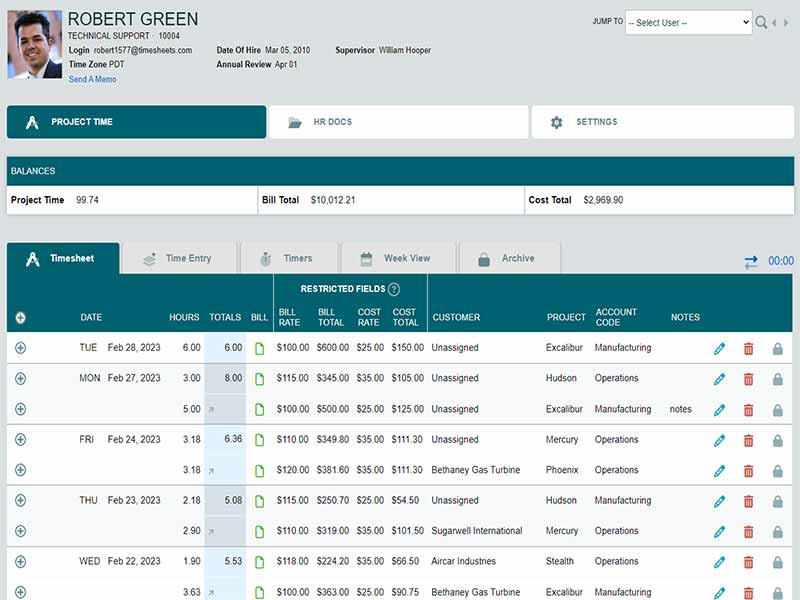
Project timesheets

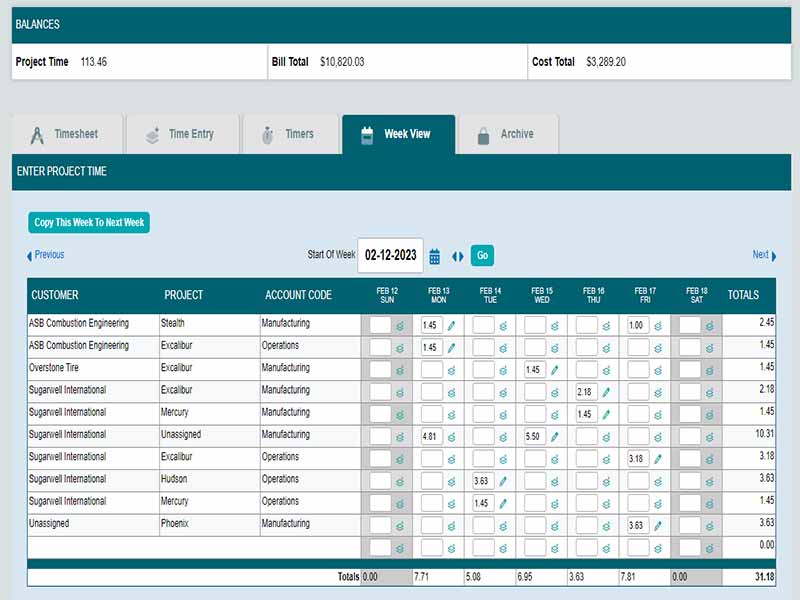
You manually track hours by project, client or job. This is useful for Billing & Job Costing. They can track time by event, or timer or weekly view. You can export time into QuickBooks and create invoices for users.

Scheduling and calendars

Admins create shifts, and staff check their hours. You can add events, move them between days, and share custom calendars with teams.

Mileage and expenses

You keep track of miles, meals, tolls and other costs. Automatic mileage rates reduce the risks of errors. You can snap photos and connect receipts, or match expenses with clients or jobs.

HR documents

You keep an archive of  performance reviews, notes,disciplinary records and uploaded files. Files remain linked to individual employee profiles according to role-specific visibility.

What is a Timesheet?

It is a cloud based time tracking platform that helps you record employee hours, monitor attendance, and organize project time.You can track hours for payroll, record project time for billing, administer paid time off, run custom calendars, track mileage and archive expense info, and save HR documents all in one platform. It is helpful for small teams looking for accurate timing without any setup complexity.

Timesheet Pricing

The platform offers three plans.

Freelancer plans are free.

The standard plan costs 5.50 per user, per month.

Nonprofit costs 4.40 per user per month

For customized timesheet com pricing, get in touch with the support team for a quote. Pricing may change.

Users of Timesheet Software

Timesheets com is for small to mid sized companies that need to track time accurately . It serves in industries such as retail, education, marketing, hospitality and manufacturing. It’s perfect for every day work, if your employees need to time track, file timesheets or log billable work. Many users searching timesheet software reviews mention the platform for its simple tools and accurate reporting.

Integrations of Timesheet

The platform integrates with accounting and payroll software. It works well with QuickBooks. It allows you to sync billable hours, payroll information and project records without manual input.

How does Timesheets software work?

  • Sign in to your account using your registered email and password
  • Manually enter the time or use a timer for time tracking
  • Assign clients and other items in a list to specific people if necessary
  •  Adjust bill and cost rates for each user or job.
  • Easy to Request and Approve PTO requests.
  • Drag and drop events or copy and paste days or weeks for scheduling
  • Track mileage and expenses by logging items and attaching receipt photos.

Choose Timesheets.com for Accurate Time Tracking, Payroll, and PTO Management

Choose it If you require, time tracking, project management and billing all in one program. It’s a good fit for teams using QuickBooks and seeking tidy payroll prep. Data is secured with security tools, such as a photo timestamp and IP controls.Timesheet software reviewers mentioned that they pick us for being accurate and less setup time.This platform is great for SMB teams who need daily time tracking including clear auditing and control over billable work.


Employee information management Included
Applicant Tracking Included
Performance Records Included
Attendance Tracking Included
Employee Onboarding Included
Training Records Included
Benefits Information Included
Compensation Records Included
Employee Self service Included
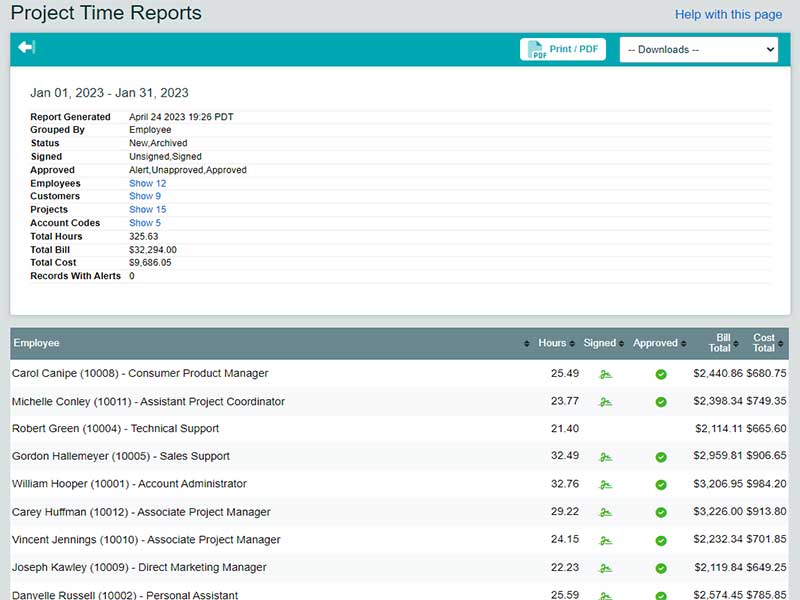
Workforce Reporting Included

Pros

4
  • Accurate time tracking
  • Strong timesheet com reports
  • Quick live help over the phone, chat or email
  • Reliable customer service

Cons

2
  • Certain admin tools could benefit from better design
  • Mobile set up time may be longer

Timesheets.com HR Software Reviews

Overall Rating

4

2 Review(s)

Rating Distribution

5

(0)

4

(2)

3

(0)

2

(0)

1

(0)

Share your experience

John S.

Consulting

Ease of use
8
Value for money
8
Customer Support
7
Functionality
8

My software review

Pros

The platform has been a dependable part of our daily operations. It handles core tasks smoothly and keeps everything organized without adding complexity.

Cons

Limited advanced customization options.

Damian K.

Technology

Ease of use
8
Value for money
9
Customer Support
7
Functionality
8

An excellent System

Pros

The software offers a good mix of features that support our workflow and improve efficiency. It covers most of our needs, though there are occasional areas where improvements could enhance usability. Still, it delivers solid value for the price.

Cons

Occasional lag in updates or syncing.

Frequently Asked Questions (FAQs)

Yes, It includes API access.

 It supports English and Spanish for daily use.

It connects with QuickBooks.

Yes, It works on mobile devices.

Retail, education, marketing, hospitality and manufacturing small and mid size teams.

Support: is provided through chat, phone, email, FAQs and knowledge base.