

Overview
SysAid delivers a modern approach to IT service management by giving you full visibility into your IT operations. From resolving the ticket to executing a workflow, every process remains transparent, linked and manageable in easy way. The platform has the features you need to do business but if there are other tools and apps that work for your company, SysAid easily integrates with them.It is a trusted help desk software that unifies the help desk function with IT asset management, BI/analytics and automation. This single service desk follows ITSM best practices to manage incidents, assets and service requests without switching tools. Whether you’re running a small IT shop or an enterprise help desk, SysAid’s ITSM is designed to grow alongside your organization and manage all your IT services.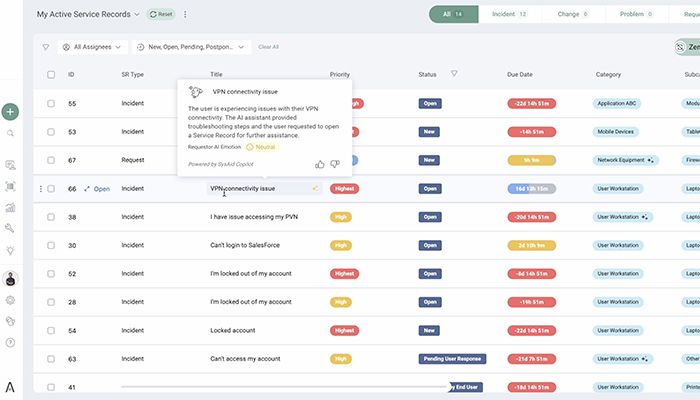
SysAid Specifications
Contact Management
Lead Management
Opportunity Management
Sales Forecasting
What Is SysAid?
SysAid is a cloud-based and on-premise IT service management solution tailored to companies of all sizes. It allows you to handle technology-related duties through systematic workflows and automation.With its flexible SysAid ticketing system, it provides ITIL process and modular workflows..The platform makes it easy to resolve conflicts, handle service requests and keep track of changes while being compliant with ITSM frameworks.
Benefits of SysAid
- SysAidʼs help desk software centralizes all IT requests, making ticket handling faster and more organized for your team.
- Enable faster response times and minimizes manual error with the SysAid ticketing system, which automates all the processes of ticket creation, routing and escalation.
- SysAid ITSM includes ITIL, aligned processes to deliver professional service and support. Manage , problems, changes and service requests at an affordable price.
- With SysAid hardware and software asset management, users get full visibility of assets.
- SysAid patch management helps keep systems secure by enabling automated patch deployment and monitoring vulnerabilities.
- SysAid service desk streamlines workflow and frees up time through task automation.
- With SysAid software, you can choose between cloud-based or installed deployment to accommodate your infrastructure.
- Built-in analytics and reporting in SysAid technologies monitor performance, spot trends, and ultimately deliver better service.
- IT teams can manage tickets and incidents whenever, wherever with SysAid’s mobile access through ITSM apps.
SysAid easily and securely integrates with other applications to improve teamwork such as, including Jira, Microsoft Teams, and Slack.
SysAid Pricing
SysAid CRM operates on a quote-based system and has three editions: Help Desk, ITSM, and ITSM Enterprise. Each plan targets different levels of IT service maturity.
The Help Desk version includes incident management, self-service portal, automation, chat, asset discovery and performance reporting. The ITSM version further augments these functionalities with change management, problem management, service level management, CMDB and API plug-ins, and advanced configuration. ITSM Enterprise includes all of the above, as well as managed implementation, professional services and priority support.
In order to get a quote for SysAid’s pricing, you will need to contact the vendor and receive a free quote according to your company’s needs. A SysAid free trial for 30 days give you an opportunity to try various features and workflows before deciding whether or not to finalize a deal with SysAid pricing.
SysAid Software Users
SysAid Service Desk Software is used by organizations in a wide range of industries such as:
- IT services
- Healthcare and hospitals
- Financial services
- Computer software companies
- Human resources departments
The users depend on SysAid’s assistance tools in order to raise a request, manage assets, and improve service delivery response times.
SysAid Integrations
SysAid Supported integrations include:
- Microsoft Teams
- Jira
- Slack
- Zapier
- Azure
- Google Apps
- Oomnitza
- TeamViewer
These integrations enhance the features of your SysAid help desk for better collaboration , automation and asset tracking.
How Does SysAid Work?
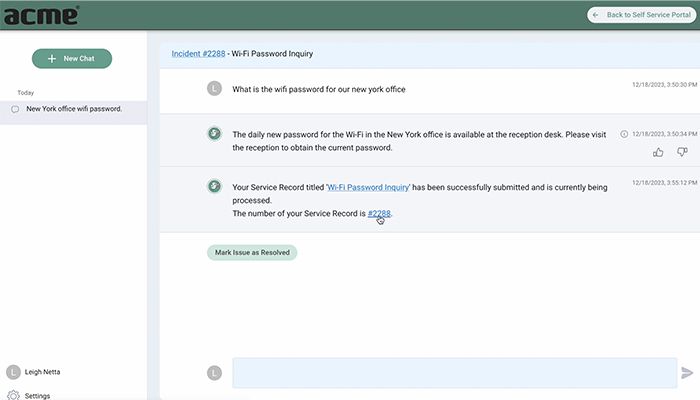
SysAid service desk software works by centralizing IT requests into a single platform. Users submit tickets through email, portal, or chat. Customers raise tickets via email, portal or chat. The system sorts, prioritizes and routes requests automatically based on predefined rules. The automation educes response time and ensures consistent handling.
IT departments leverage dashboards for keeping tabs on incidents, managing assets, monitoring performance and analyzing trends. With built-in reporting, SysAid ITSM helps you identify recurring issues and improve service quality over time.
Choose SysAid for Smarter IT Service Management
Choose SysAid ITSM if you need an orderly and yet flexible service desk, automation power, visibility, and scalability. It’s a good fit for teams who require ITIL-compliant processes that aren’t too heavily customized at the outset.
SysAid Features
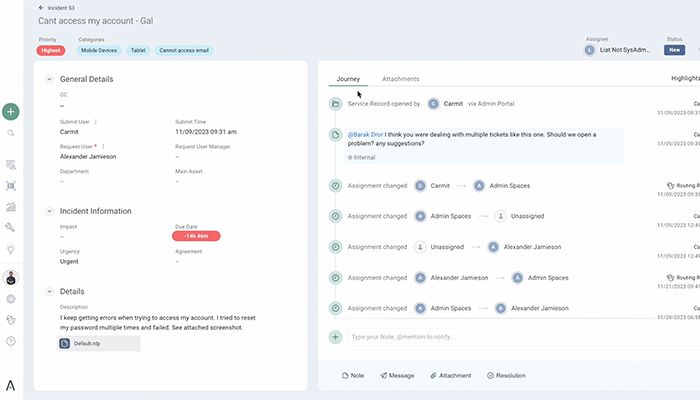
The SysAid help desk includes ticket management , automatic ticket creation, routing, alerting and escalation. This relieves the manual work, and delays are avoided in service requests.
Using automation rules, SysAid software takes care of routine activities like alerts, updates, and assignments. This feature has been praised by quite a few SysAid reviews for increasing productivity.
The on-premise portal enables customers to log requests, search FAQs and solve general problems themselves. This lowers ticket count and increases user satisfaction.
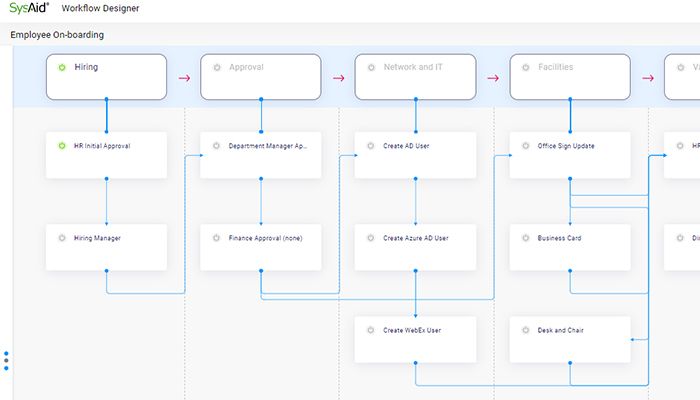
Visual workflow designer assist you streamline complicated IT processes. You can build workflows that reflect your internal policies and servicing needs.
SysAid help desk centralizes and coordinates all IT tasks from request to resolution. This results in better accountability and service quality.
See The Software In Action Watch Free Demo!
Top Recommended Software






SysAid Reviews
FAQs
Yes. The majority of SysAid reviewers say that the software is user-friendly once configured.
APIs access is available in higher-tier editions.
IT, healthcare, finance, HR software rely on SysAid service desk.
Yes. There is a free SysAid trial for 30 days.
Yes. Many users compare SysAid alternatives when looking for flexible ITSM solutions.
