

Overview
This time management software helps in the recognition of growth patterns and enhances concentration. Businesses can automate time monitoring that has been spent on websites and apps. Project managers can utilize RescueTime to track time being spent on tasks, projects, and clients. If your organization needs a platform that can simplify the comprehension of digital habits for optimal time management, then this is it. There are tools like analytical reporting that provide the required insights into routine digital activities.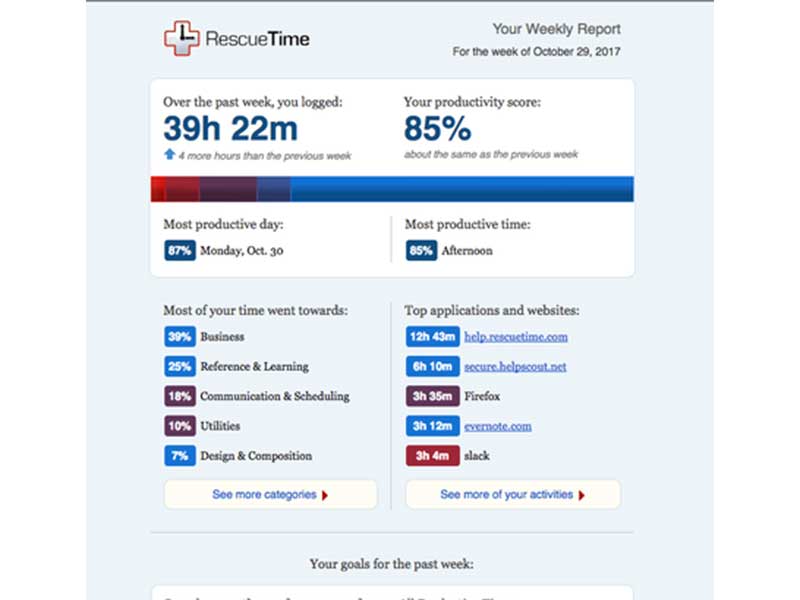
RescueTime Specifications
What is RescueTime?
This software is intuitive and cloud-based, with the primary purpose of optimizing companies’ time management capabilities. RescueTime software can measure productivity and sum up the timelines of employees’ working hours. These calculations aid in monitoring the digital activities of staff members, which includes applications. Websites, computers, and windows. The time spent on meetings, phone calls, email, chatting, and breaks between the assigned duties can also be measured. These insights are crucial to predict growth outcomes.
What is the Best Usage of Rescue Time?
Rescue Tiem is a smart software that is popular because of its easy usage. RescueTime Inc. takes pride in its software products being simple and user-centric. Reviewing the provided data is also not difficult due to its capability to summarize extracted data legibly. The growth of all individuals can be observed in the form of graphs, and group activities can be tracked conveniently. Users can easily concentrate on their digital tasks without worrying about this software; it provides on-screen reminders without hindering or requiring manual intervention.
RescueTime Cost
There are flexible cost plans offered by the vendors. You can get a personalized RescueTime Pricing quote that suits your unique operational needs, budget capacity, and user volume just by clicking on the ‘Get Pricing’ option above.
RescueTime Integrations
Third-party apps and tools integrations are supported by this PMO software solution, which includes:
- Microsoft 365
- Slack
- Microsoft Outlook
- Google Calendar
You can also book a complimentary RescueTime demo for a detailed walkthrough of its integrations.
Who can use RescueTime?
All scales of operations and diverse sectors can utilize this project management software:
- Healthcare
- Advertising
- Construction
- Marketing
- Accounting
- Entertainment
- Information Technology
RescueTime Implementation
After installation, add your credentials for an authorized RescueTime login. Navigate to the dashboard and start tracking the time zones of routine employee activities legibly. Objectives can be automated with notifications after completion, and also alerts when time is being wasted on digital distractions during runtime. Notifications can be automated for progress, and session durations can be modified according to task priority. RescueTime Timesheets can be used to get an overview of daily, weekly, or monthly productivity analysis. To ensure unhindered concentration on the task at hand, users can leverage RescueTime Focus.
If you are interested in learning more about the implementation, performance, and features of this software, booking a free RescueTime demo might be a great idea.
Is RescueTime The Right Choice?
Businesses in search of a software that is both secure and smart, then Rescure Time is a game-changer on that account. This time management software monitors growth and alerts the managers about idle wasting that can be dealt with through prompt notifications. Through this, productivity measures can be taken to identify all the improvement gaps. This aids in task completion, concentration, and meeting deadlines.
If you have questions about the performance of this software, then contact our customer support team. This PMO enables authorization with encryption and authentication checks that make it very popular among companies with sensitive data. You can read RescueTime reviews for more outlooks.
RescueTime Features
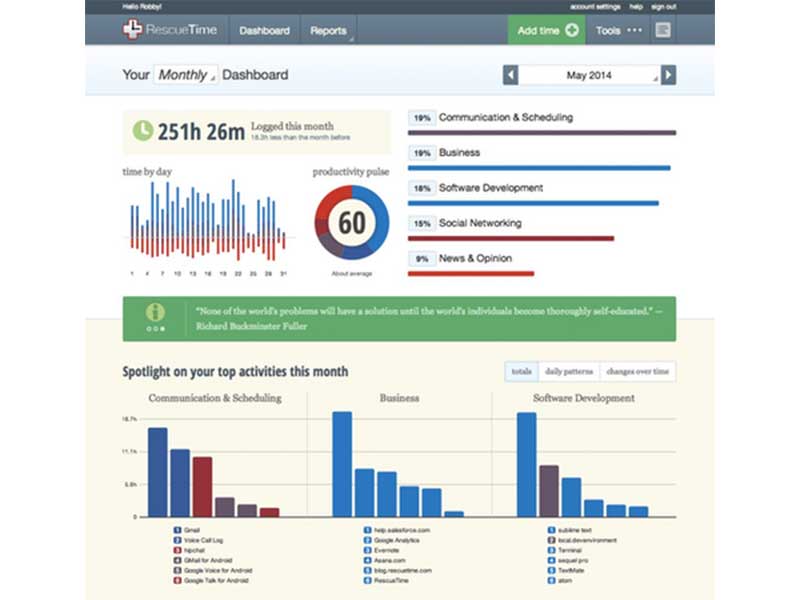
RescueTime Timesheets can be used to visualize whether the time being spent on the task is optimal or not. Through this, all the time logs of the project task and social media activities get arranged legibly in an activity calendar form. From these tools, roadblocks are identified, workloads can be balanced, improvement gaps can be identified, and better time management can be implemented.
These tools enable project managers to set timelines and deadlines for tasks, allowing enhanced monitoring. With objective clarity, the productivity of the team member increases significantly. All data input is fully automated; there is no need for manual intervention for time entries.
Managers and leaders can track ongoing trends for prompt productivity through this project management software conveniently. Trend monitoring provides valuable insights for the implementation of them. These enable managers to make outcome-oriented decisions that can be effective for streamlined project execution.
RescueTime Focus creates a barrier between distractions and the user, ensuring productivity is at an individual level. This platform can monitor websites, social media apps, and other distractions and automate alerts so the user is always aware of time wasted and can fully concentrate on the project task.
Activities can be personalized based on the reports, allowing users to personalize tasks according to the staff’s span of attention. With increased knowledge about time zones and digital usage by employees, managers can set break times and task deadlines accordingly.
See The Software In Action Watch Free Demo!
Top Recommended Software






Pros and Cons of RescueTime
RescueTime Reviews
Frequently Asked Questions (FAQs)
A: Certainly, this PMO does have a free plan available known as RescueTime Lite.
A: Yes, the Rescure Time management solution is web-based.
A: English is the language that the Rescue Tiem supports.
A: RescueTime project management allows buyers to get answers through help desk, phone support, chat assistance, RescueTime reviews, FAQs, knowledge base, and email. You can also get details about the RescueTime pricing.
A: There is a Rescure Time app that provides remote convenience for time monitoring. Users can have access to the functionalities of this software platform through a single RescueTime login.
A: No, the RescueTime API is unavailable.
A: Certainly, iOS and Android handheld devices are supported by this project management software, with a requirement for a RescueTime login to access the dashboard, according to RescueTime reviews.
A: Yes, there is a complimentary RescueTime free trial option for 14 days, and you can also request a free RescueTime demo.
A: Indeed, the apps this Rescure Time tool integrates with are Google Calendar, Slack, Microsoft 365, Microsoft Outlook, etc.
A: RescueTime alternatives could be ManicTime, ActivityWatch, Timely, Forest, Clockify, etc.
