

Overview
To attain business excellence, ProjectManager can help optimize all the ongoing and future project operations in no time. This marvellous and feature-rich system can transform your resource allocation, team coordination, project strategizing, and analytical reporting capabilities. Organizations are now leaning towards easy-to-use interfaces loaded with diverse tools to save time and streamline project processes promptly, making this a perfect professional partner. To learn more about this unified platform, read the ProjectManagement reviews.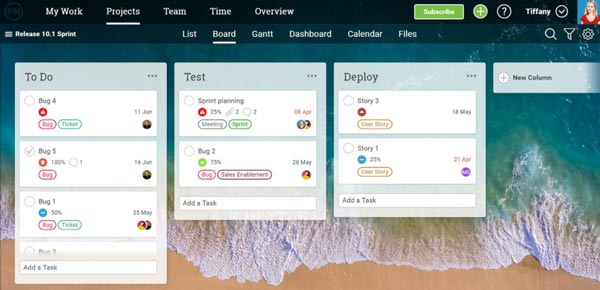
ProjectManager Specifications
What is ProjectManager?
Businesses can navigate their project processes with ease through the utilization of this work management software. ProjectManager software keeps the team members on the same page, ensures appropriate resource allocation, provides detailed analytical reports, and automates workflows. This platform is designed with a comprehensive suite of features that includes time monitoring, analytical reporting, project strategizing, task assignment, budgeting, documentation, and many other features.
What Is ProjectManager Famous For?
This project management software is popular due to its coordination features, especially for managing hybrid teams. Managers can leverage their secure collaboration tools to keep the hybrid team synchronized, ensuring smooth project operations. Those collaboration tools include Gantt charts, project dashboard, Kanban board, and list view.
ProjectManager Integrations
Third-party apps and tools integrations are supported by this PMO software solution, which includes:
- Zendesk
- Trello
- Evernote
- Jira
- Dropbox
- Slack
- Xero
- Salesforce
You can also watch a free ProjectManager demo to learn more about its integration capabilities.
ProjectManager Users
All scales of operations can leverage this work management software. Startup businesses to enterprise-level companies from diverse industries who have popularized this PMO system are:
- Technology
- Manufacturing
- Food and Beverage
- Construction
ProjectManager Pricing
The cost plans for this system are:
- Business: $28/month/user
- Enterprise: Personalized ProjectManager price
- Teams: $16/month/user
The final ProjectManager cost depends on aspects, which include user volume, business requirements, user preferences, industry type, and other unique feature needs. You can get a tailored quote by clicking on the ‘Get Pricing’ option.
How Does ProjectManager Perform?
After installation, add your unique credentials for an authorized ProjectManager login, and then navigate to the smart dashboard and start setting up multiple projects. Managers can assign tasks with set deadlines, better completion rates, and timely project execution. There are also tools to automate repetitive administrative tasks, allowing team members to focus on priority tasks. The priority status of the task can also be altered, depending on the operational requirements. The authority, approvals, roles, limitations, and permissions can be established. Teams can collaborate without any hassles and stress of privacy breaches. All project documentation can also be securely stored in a centralized location for convenient and rapid access.
If you want details and an easy-to-understand walkthrough of this PMO system’s performance, request a free ProjectManager demo. With tutorials like representation, you easily grasp its feature implementation in project operations.
Is ProjectManagement Software the Right Choice?
If you are in search of a platform that can provide your project operations with progressive insights, precision, and agility, then this is the right choice. With ProjectManagement software, you can store all sensitive information in a unified location for easy access and collaborate with team members without any privacy breaches. This system enables managers to automate administrative tasks that reduce the burden on team members, allowing them to focus on priority tasks.
If you are still confused about its suitability for your workflow and project operations, then contact our customer assistance team. You can also read the unbiased ProjectManager reviews mentioned on our website.
ProjectManager Features
It assists companies in predicting resource expenditure and pre-ordering them beforehand. Managers can monitor resource utilization so that expenditure is optimized.
Businesses have a hard time with project portfolios, which this tool can manage smartly. Team leaders can also allocate resources for a streamlined project execution, project selection becomes more convenient, and all progress-related details are provided to them comprehensively. Managers can also design a portfolio dashboard for a synchronized roadmap.
Managers can automate repetitive administrative tasks, significantly reducing the requirement for manual intervention and human errors. Team members can fully focus on the priority tasks related to the project, which can help them meet deadlines.
These tools assist in strategizing project plans to streamline operations. Project management is transformed through the usage of this system when the teams are synchronized. This work management software has been a partner of many notable companies, including BDO, AVIS, Nestle, NASA, and SIEMENS.
These tools can be very beneficial for proper scheduling, task assignment, progress monitoring, checking task completion rates, and other success metrics. This can make the project management a huge success after implementing all the informed decisions.
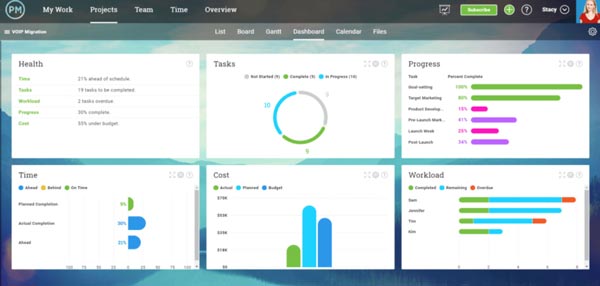
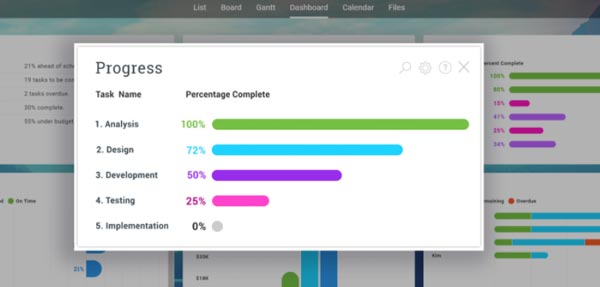
For a detailed and comprehensive overview of the project progress, this platform provides the convenience of an intuitive dashboard. Many metrics are analyzed for the detailed reports, but users can also visualize these metrics. The metrics include duties, deadline competition rates, expenses, resource utilization, project health, time zones, and outcomes. Through this tracking, it becomes easier to identify any gaps in operations for quick resolutions.
See The Software In Action Watch Free Demo!
Top Recommended Software






ProjectManager Reviews
Frequently Asked Questions (FAQs)
A: No, ProjectManager.com does not have a free plan available, but there is a ProjectManager demo.
A: Yes, the ProjectManagement software is cloud-based.
A: English is the language that Project Manager supports.
A: This project management tool allows buyers to get answers through phone support, forums, ProjectManager reviews, help desk, chat assistance, knowledge base, 24/7 live assistance, FAQs, and email. You can also get details about the ProjectManager pricing.
A: There is a ProjectManager app that provides remote convenience for task management. Users can have access to the functionalities of this software platform through a single ProjectManager login.
A: Yes, the ProjectManager API is available.
A: Certainly, iOS and Android handheld devices are supported by this project management software, with a requirement for a ProjectManager login to access the dashboard, according to a ProjectManager review.
A: Yes, there is a complimentary ProjectManager free trial option for 30 days, and you can also request a free ProjectManager demo.
A: Indeed, the apps this Project Manager software tool integrates with are Zendesk, Slack, Xero, Evernote, Trello, Salesforce, Jira, etc.
