

Overview
Brainier (now often part of the ClearCompany Learning suite) is a modern digital ecosystem built to make employee development feel less like a chore and more like a natural part of the workday. There is an initial training curve, but by using this tool, your team gets a centralized hub that replaces messy spreadsheets and outdated training manuals with a sleek, searchable library. Business personnel can benefit from automated analytical reporting for real-time performance tracking, which is the most popular requirement of large organizations.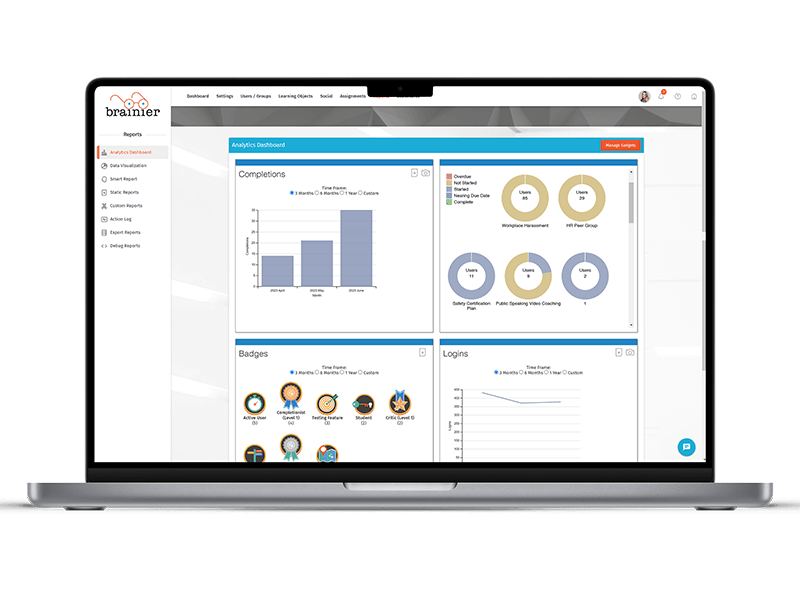
Brainier Specifications
Training Management
Activity Dashboard
Authorized Permissions
Asynchronous Learning
What Is Brainier?
Brainier LMS helps organizations manage compensation decisions with greater speed, clarity, and control. Instead of relying on spreadsheets and scattered tools, teams can automate calculations, streamline approvals, and align pay with budgets and performance goals. Managers can launch compensation cycles quickly, review recommendations, and approve updates without delays.
Brainier Integrations
Third-party apps and tools integrations are supported by this LMS software solution, which includes:
- ADP
- UKG
- Paylocity HR
- Salesforce
- Indeed
- Accurate
- AccuSource HR
- Asurint
What Is Brainier LMS Best For?
Brainier LMS is best for businesses that want to move beyond spreadsheet-based compensation planning and manage pay decisions with greater accuracy. The platform reduces risks caused by manual calculations, delayed approvals, and disconnected tools. By centralizing compensation workflows, businesses can keep salary planning aligned with budgets, roles, and performance updates while maintaining compliance. This structured approach helps HR teams respond faster, minimize costly errors, and ensure competitive pay practices that support long-term talent retention.
Who Can Use Brainier Software?
This system can be leveraged by the following industrial sectors:
- Manufacturing
- Government
- Education
- Healthcare
- Technology
- Retail
- Energy
- Nonprofit
- Real estate
- Finance
- Engineering
How To Use LMS Brainier?
Whether you are a learner looking for a specific skill or an admin building a global training program, here is how to get moving with it:
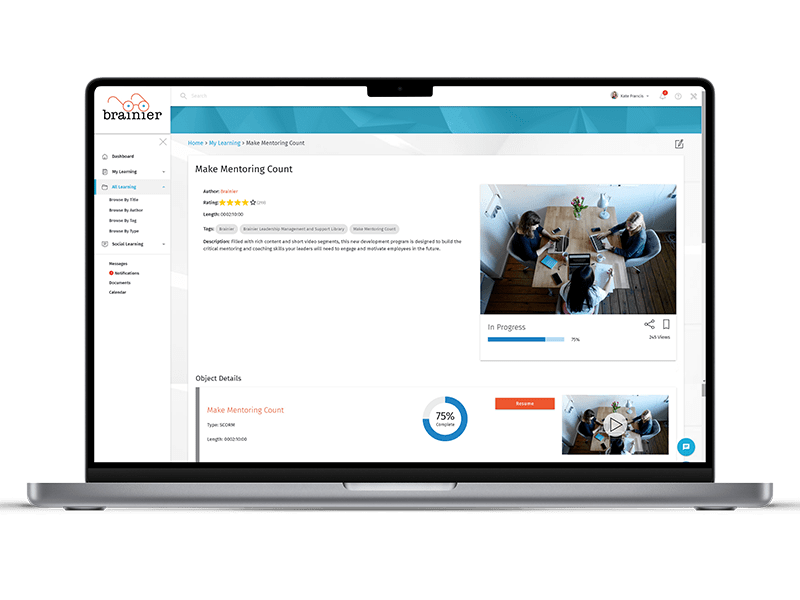
- A Brainier Log in to your personalized dashboard to show your current learning progress and any upcoming deadlines.
- Use the global search bar to find specific courses or browse the library by tags like “Leadership” or “Safety.”
- Click into a course and hit “Start” to launch the content in a responsive player that works on any device.
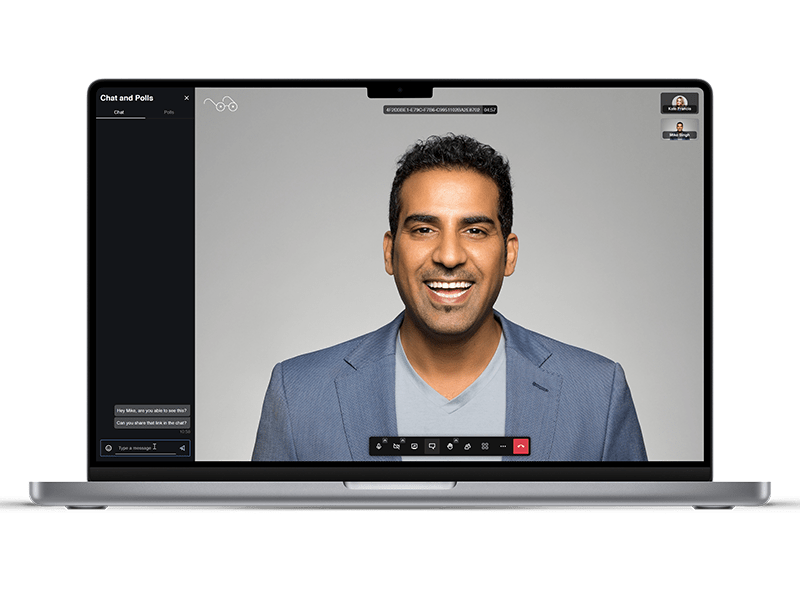
- Check your “Registered” tab to keep track of live instructor-led sessions or webinars you’ve signed up for.
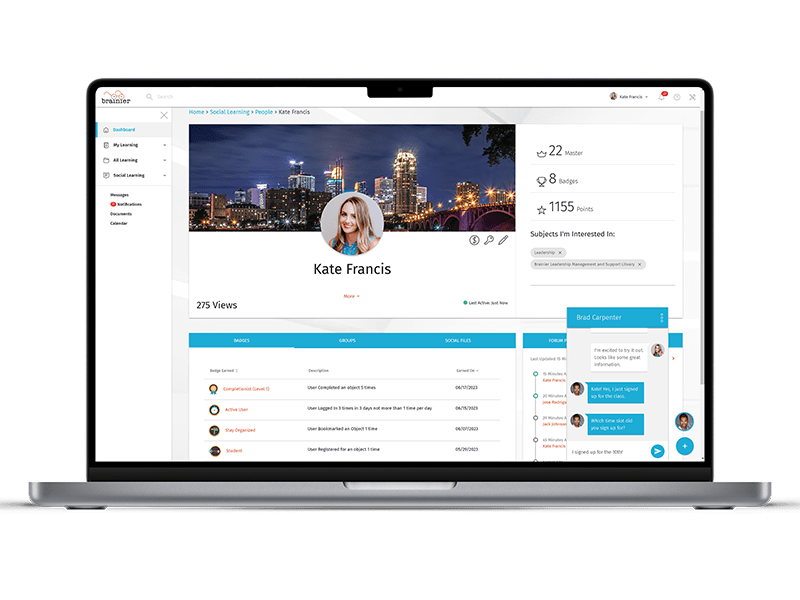
- Join social groups or discussion forums within the platform to share insights and ask questions of your peers.
- Complete quizzes and assessments at the end of modules to earn badges and digital certifications automatically.
- Use the “My Transcript” section to download your history and prove your compliance for audits or reviews.
- If you are a manager, open the reporting wizard to see real-time data on how your team is progressing.
Schedule a free Brainier demo to learn more about its usage.
How Much Does Brainier Cost?
Brainier pricing can be personalized according to your organization’s needs and budget. Click on the ‘Get pricing’ option for a custom quote.
Is LMS Brainier The Right Choice?
The software is designed to grow with your organization, whether you have fifty employees or fifty thousand. It is built on a high-performance cloud infrastructure that ensures your learning portal stays fast and accessible 24/7.
Your data is protected by enterprise-grade encryption and adheres to strict privacy standards, including the EU-U.S. Data Privacy Framework. The multi-tenant database design allows you to create thousands of unique user groups, making it easy to manage complex global teams from a single instance. It is fully SCORM, AICC, and xAPI compliant, ensuring it works with industry-standard training content. The platform also automates recertification and maintains audit-ready records to keep your business compliant with local and federal regulations effortlessly.
Connect with our customer support team to have all your software queries answered. You can also watch a free demo or read the unbiased Brainier reviews.
Brainier Features
BrainierLMS includes built-in content authoring tools that allow organizations to design and publish training courses without external software. Using its native content creation platform, teams can transform documents, videos, and presentations into structured eLearning modules. The system also supports industry standards such as SCORM and AICC, making it easy to upload existing learning assets and deliver consistent training across the organization.
The platform provides a powerful reporting suite that helps administrators monitor training performance in real time. Custom dashboards, smart reports, and data visualizations display course completions, learner progress, and assignment status. Managers can generate scheduled reports or build customized analytics views, allowing organizations to track learning outcomes and identify development gaps quickly.
This system integrates embedded AI capabilities that simplify learning management and improve training effectiveness. AI features can generate quiz questions, surveys, and content descriptions, helping administrators build courses faster. The platform also analyzes learner activity to recommend relevant training content and provides AI-driven coaching feedback during video-based learning exercises.
A Brainier login supports automated onboarding workflows that help organizations train new hires efficiently. Administrators can bulk import users and assign learning tracks based on job role, department, or group structure. New employees automatically receive the courses, policies, and certifications required for their position, ensuring a consistent and organized onboarding experience across the company.
The LMS integrates with broader talent management ecosystems, allowing organizations to connect hiring, learning, and workforce development processes. Through integrations and APIs, companies can align applicant tracking systems with training programs so that new candidates and employees move seamlessly from recruitment to onboarding and professional development.
A Brainier log in provides tools that support structured performance reviews and development feedback. Features such as behavioral evaluations, coaching modules, and structured assessments help managers measure how well employees apply what they learn. These evaluation tools help organizations align training programs with real workplace performance and continuous improvement goals.
By linking learning progress with employee development initiatives, LMS Brainier helps organizations connect training outcomes with career growth and compensation planning. Managers can track completed certifications, skills development, and learning achievements, giving leadership valuable insights when making promotion or compensation decisions tied to professional growth.
See The Software In Action Watch Free Demo!
Top Recommended Software






Brainier Pros and Cons
Brainier Reviews
Frequently Asked Questions
A: Certainly not, the Brainer software does not have a free plan available.
A: Yes, Brainier LMS is cloud-based.
A: English, Swedish, Chinese, Spanish, German, Portuguese, French, Korean, Japanese, and Arabic are the languages that the Brainier software supports.
A: Brainier LMS allows buyers to get answers through phone support, chat assistance, and email. You can also get details about the Brainier pricing.
A: There is a Brainier app that provides remote convenience for training management. Users can access the functionalities of this software platform through a single Brainier login.
A: Yes, the Brainier Elan REST API is available.
A: Certainly, iOS and Android handheld devices are supported by this digital learning software, with a requirement for a Brainier log in to access the dashboard, according to Brainier reviews.
A: There is a Brainier no free trial option, and you can also request a free demo.
A: Indeed, the apps this tool integrates with are Salesforce, ADP, Paylocity, etc.
