

Overview
Organizations face a tough time with data management, which is why an automated platform is a requirement. Airtable can provide all the managerial assistance your company might be missing out on. This cloud-based platform makes an AI-powered workflow that is a powerful solution to simplify administrative overhead. This practical and simplified platform allows businesses to have efficient coordination mechanisms and streamlined project monitoring capabilities.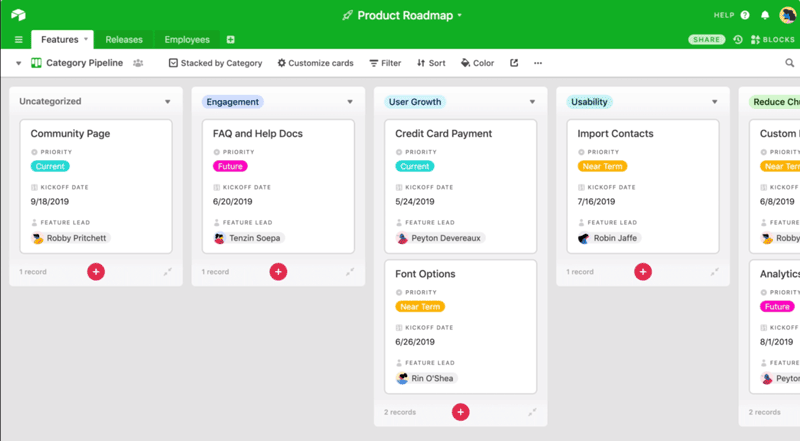
Airtable Software Specifications
What is Airtable?
This is an intuitive cloud-based PMO platform that assists organizations with powerful managerial capabilities, data organization, and coordination. Project managers can utilize Airtable CRM to keep team members synchronized on the project procedures through unhindered coordination. This platform can utilize artificial intelligence to help transform your business, track all project processes in real time, and automate laborious tasks for less time consumption.
What is Airtable Used For?
Airtable interfaces are easy to use and provide users with all the modification capabilities to mold them according to their preferences. This is a practical system, especially for building conversations among the team members for the exchange of sensitive project information. Project managers have control over project operations when all workflows can have integrated AI.
Airtable integrations
Airtable integrations with some of the third-party apps are provided below:
Airtable Pricing
The Airtable cost depends on the provided plans by the vendors:
- Business: $54/month/seat, annually billed
- Free: $0/month/seat
- Team: $24/month/seat, annually billed
- Enterprise: Personalized
You can get the Aritable software pricing plan that is suitable for your business’s unique requirements.
Note: Prices can be changed over time.
How to Use Airtable?
After installation, add your unique credentials for an Airtable login and then navigate to the simplified dashboard for exploration. The Airtable dashboard can be modified according to the preferences of the user and workflow requirements. Data arrangement is a crucial step because it needs to be accessible, which is why the viewing can also be adjusted, for example, grid, calendar, list, card, etc. Airtable as CRM provides robust coordination means in a centralized location. All updates can be done from this unified platform, and the team members are notified effectively. Daily administrative tasks can be automated, leading to a significant reduction in manual errors and efficient time management.
If you want to have more details, then request a complimentary Airtable demo. You can also contact the sales team to discuss the Airtable price according to the features you require.
Who Can Use Airtable AI?
Airtable automations can be leveraged by the following niche-specific departments:
- Event planning
- Sales and Marketing
- Project management
- Customer Relationship Management
- Content Creation
Airtable Alternatives
There are some PM software that can be an Airtable alternative:
- Smartsheet
- Coda
- Microsoft
- ClickUp
- SmartSuite
- NocoDB
- Notion
Is Airtable Automation The Right Choice?
There are no Airtable competitors that can match its scalability, flexibility, and data accessibility. Furthermore, more offerings include CRM capabilities, data accessibility through modifications, inventory control, powerful integrations, automation, and secure information storage. This platform is powerful and can connect apps, synchronize teams, and automate workflows. Businesses interested in simplifying the intricacies of their project operations and data management should opt for this project management software.
If you are still unsure about the suitability of this platform for your project operations and business workflow, then contact our customer support team. Our software experts are always eager to hear from you and will provide all the needed details. You can also read Airtable reviews for a third-party point of view or schedule a free Airtable demo. You can also discuss the Airtable costs with the sales team to get a tailored quote that satisfies your budget capacity.
Airtable Features
These reporting features work according to the user preferences. Users can analyze all the necessary metrics and gain automated access to these detailed reports. To view this data, users can comprehensively modify the interface by gaining all the analytical data in the form of graphs, lists, diagrams, charts, etc. Airtable templates enhance data arrangement capabilities with legibility, so the reports can be shared.
The Airtable interfaces can be personalized with the help of a designer. This enhances satisfaction rates of the users when they can conveniently modify the interfaces to suit their work style. Managers can modify the permissions and roles with respect to data access.
These tools help by keeping the data synchronized with the external sources. This unified platform enables records to be stored safely from multiple bases through real-time synchronization.
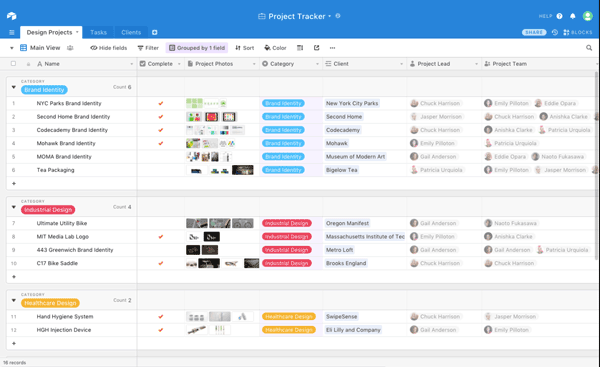
Airtable forms can be used to modify the way data is presented to the user. It is crucial that in a busy work atmosphere, data gets presented in a way that is legible and comprehensive. Managers are provided with many options, like grid, list, form, calendar, Kanban, gallery, cards, Gantt, and other views. Managers can select multiple types of viewing formats for different information.
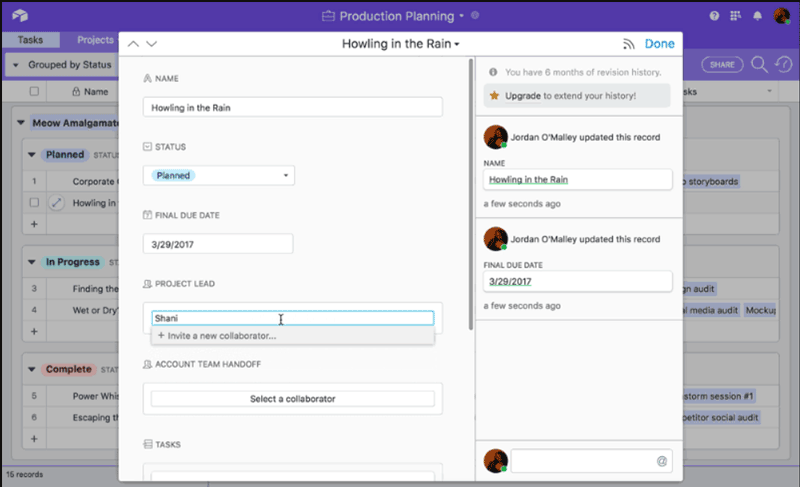
Airtable for project management is mostly used to streamline daily tasks and reduce the administrative clutter. The daily tasks have a lot of room for manual error, which can be significantly reduced through workflow automation. The automation can be personalized according to the tasks.
See The Software In Action Watch Free Demo!
Top Recommended Software






Airtable Software Pros and Cons
Airtable Software Reviews
Frequently Asked Questions (FAQs)
A: Certainly, the Airtable free plan is available, but there are some Airtable free plan limitations, one of which is suitability for small teams with some missing features.
A: Indeed, Airtable AI for document management is cloud-based.
A: English is the language that comes with Airtable support.
A: Airtable as CRM allows buyers to get answers through informative guides, help desk, chat assistance, phone support, FAQs, Airtable reviews, and email. You can also get details about the Airtable costs.
A: Certainly, there is an Airtable app. Users can remotely access the functionalities of this software platform through an Airtable login.
A: Of course, the Airtable API access is available.
A: Indeed, there is an Airtable free trial option and a free Airtable demo.
A: Certainly, iOS and Android handheld devices are supported by this as a collaboration management system with a requirement for an Airtable login.
A: Indeed, the apps with which Airtables integrates are Asana, Trello, Google Drive, Box, Zendesk, Salesforce, etc.
A: Airtable pricing is flexible and tailored according to the unique business needs.
