

Overview
Businesses and project managers have other project-related tasks to focus on rather than tracking timelines, ensuring streamlined workflows, and managing employees. WorkComposer provides the necessary automation that manages all that and more. Organizations can automate team coordination, visualize missed deadlines, and optimize project operations. Managers truly appreciate the easy-to-use interface that saves their time.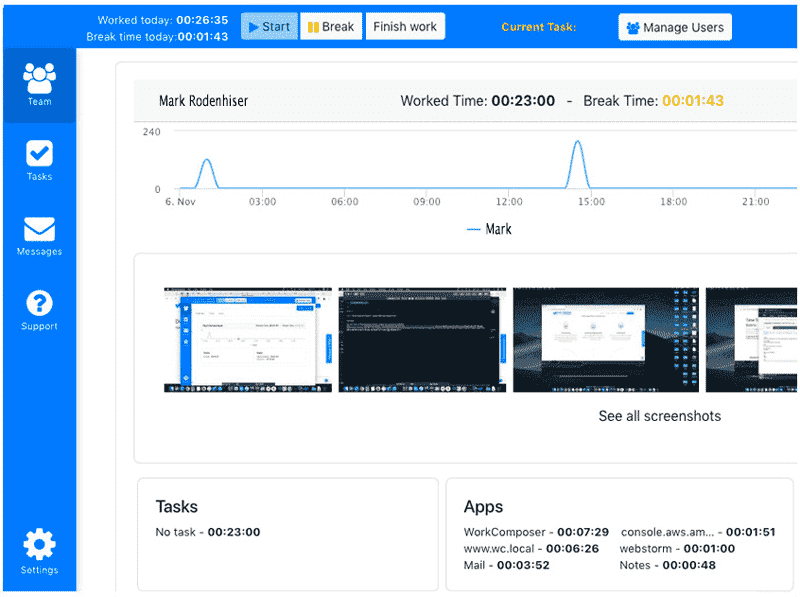
WorkComposer Specifications
What Is WorkComposer?
This work management system is efficient for employee monitoring and tracking their active work hours with automation. This system can conveniently monitor active work hours, time spent on unproductive applications, check-ins/outs, and unusual work patterns.
What is WorkComposer Best For?
This task management platform allows managers to monitor active work hours and time spent on tasks without reliable internet connectivity through offline mode. Businesses can also store screenshots of employee screens at random intervals without compromising employee privacy.
WorkComposer Integrations
This platform offers API access, enabling businesses to integrate this project management system with their existing database.
WorkComposer Cost
The vendors provide three pricing plans:
- Premium: $5.5month/user
- Standard: $3.3/month/user
- Enterprise: Personalized WorkComposer Pricing
If billed annually, the price goes down to 2.99/month/user. You can also request a custom quote that suits your unique business needs and user volume.
Work Composer Users
All scales of operations of diverse industries can benefit from this software, which includes:
- Technology
- Retail
- Hospitality
- Technology
- Manufacturing
- Healthcare
How Does WorkComposer Perform?
After installation, add your unique credentials for an authorized WorkComposer login, then navigate to the smart dashboard and explore the monitoring options. Managers can begin monitoring the work hours through their preferred tracking option, and they can also track the work patterns of specific employees by naming tasks.
If you are interested in learning more about the functionalities of this intuitive software, then request a free WorkComposer demo.
Is WorkComposer Time Monitoring System the Best Choice?
This secure platform enables businesses to visualize all operational activities, which saves money when employee distraction is significantly reduced. It enables managers to manually, silently, or automatically track the user engagement with productive or unproductive websites in real-time. These insights are relevant for outcome-oriented improvements.
You can also contact our customer assistance team to learn about the suitability of this system for your organization’s demands. You can read the unbiased reviews or watch a free demo.
WorkComposer Features
This module provides automated work hours monitoring through evaluating activated systems. These features can identify breaks intuitively, and employees can also work offline without any reliance on an internet connection. These modules capture accurate timeframes of project operations, breaks, offline, and other tasks.
Through artificial intelligence, this system identifies work patterns and notifies employees about breaks for an efficient work environment.
Work Composer provides the details of the time spent on various websites and apps to reduce distractions and optimize growth. Managers can also receive URLs of the visited websites during active hours. Managers can identify productive apps, and the time spent on them will be considered as work, but time spent on unproductive websites will automatically count as a break through blacklisting. With such comprehensive reports, improvements can be made promptly.
With these modes, working hour information is silently monitored in the background. Members are aware of the monitoring with a tiny icon. These modes automatically capture data relevant to system usage and unproductive usage.
Managers can generate multiple tasks and collectively manage the crucial aspects of them. Those aspects include time management, resource allocation, missed deadlines rates, and progress monitoring. Team members can utilize the desktop application to select, switch, and mark their tasks. Employees can simply click to let managers know about their completed duties. The time spent on task can be tracked and compared for prompt adjustments.
Managers can receive screenshots of the employee’s screen at random time intervals for effective tracking that fosters accountability. The screenshots can be blurred to maintain privacy and can be viewed comprehensively. The screenshots are securely stored and accessed in the database.
See The Software In Action Watch Free Demo!
Top Recommended Software






WorkComposer Pros and Cons
Pros
Intuitive and user-friendly interface Responsive client assistance team Automate break tracking Detailed team performance metrics Assists in generating personalized Invoices App and website usage can be monitored A credit card is not a requirement for a complimentary trial Employee active work hours can be measuredWorkComposer Reviews
Frequently Asked Questions (FAQs)
A: No, this PMO does not have a free plan available.
A: Yes, the WorkComposer employee work hour management solution is cloud-based.
A: English is the language that this time monitoring software supports.
A: This time management tool allows buyers to get answers through chat assistance and email. You can also get details about the WorkComposer pricing.
A: There is no WorkComposer app that provides remote convenience for employee time tracking. Users can access the remote functionalities of this software platform through a single WorkComposer login on the web.
A: Yes, the WorkComposer API is available.
A: Certainly, iOS and Android handheld devices are supported by this work hour tracking and management software, with a requirement for a WorkComposer login to access the dashboard, according to WorkComposer reviews.
A: Yes, there is a WorkComposer free trial option for 7 days, and you can also request a free WorkComposer demo.
A: API access is available, enabling businesses to integrate this project management system with their existing technology stack.
