Overview
For better project monitoring, managers search for a software solution that can do it all. Project insight can assist in streamlining the project processes through centralizing the operations, providing all the necessary tools that can be needed for better task completion tracking, allotting tasks to the staff members, automating workflows for more accuracy, and empowering staff in making better decisions that are massively beneficial for project optimization. These software tools are the core of keeping the project processes running smoothly. All scales of operations can utilize this intuitive platform that controls the day-to-day administrative aspects with no chance of human error.
Project Insight Specifications
What is Project Insight?
This intuitive platform is very advantageous for optimal project management when all the resources, finances, tasks, and progress are being actively monitored. Managers, IT personnel, staff members, and other related teams can get detailed reports regarding the project so they can make strategic decisions. Project Insights simplifies workflow by automating it and unifying the processes for synchronization. All the tasks must be fulfilled within the allotted time; otherwise, it can disrupt the streamlining of the processes. Enterprises truly appreciate the unified hub when their enterprise-grade projects can be managed efficiently and precisely.
Insight Project Purpose
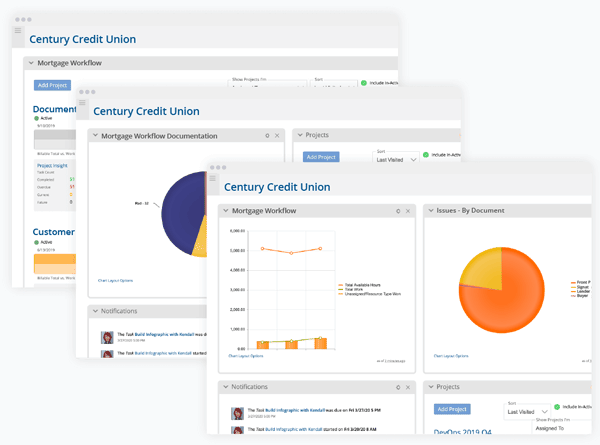
The main purpose of this software platform is to get the data about all the running projects in an organization, so nothing can be missed. This software is loaded with robust managerial and reporting features that allow managers to get valuable insights about the administrative tasks, program progress, and employee performance. Project leaders can have a comprehensive view of the time zones, budget, resources, duty allotment, and schedules through an intuitive dashboard. Moreover, this platform can seamlessly integrate into your current system for improved performance and eliminate the need to re-enter all the previous data.
Insight Users
All the companies that are in the growth stage can leverage this software platform to the fullest:
- Manufacturing
- Financial services
- Environmental services
- Healthcare
- Information Technology
- Field services
- Professional services
- Government
- Software Development
- Professional services
Insights Integrations
This software acts as a centralized hub for many third-party apps and other software solutions. This supports the integration of products that deal with communication, budget, ticking, CRM, etc.
These integrations include:
- Salesforce
- Jira software
- Microsoft 365
- Slack
- ServiceNow
- Box
- SAP
- HubSpot
- QuickBooks Online
- Basecamp
- Azure DevOps
- Google Drive
There are multiple functions of these integrations, like better team coordination, financial synchronization, process visibility, scheduling, and data access.
Insight Pricing
There are flexible costs offered by the vendors on the official website of this software solution, according to the stage of productivity:
- Enterprise: Personalized
- Free: $0/month/user
- Business: $19/month/user
- Pro: $9/month/user
You can get in contact with the sales team to dive deeper into the pricing details of this software platform. There are different add-ons that come with the pricing plan, like more features and tools. There might arise a need to make this software platform more suitable for your productivity, so timely upgrades are necessary. Get tailored isight pricing according to your needs and budget capacity.
Insight Project Application
After installation, add your credentials for an authorized login and navigate the intuitive dashboard. Users can get authorizations and allot positions to different personnel for streamlined procedural management. PMOs can personalize the dashboard according to the staff, project requirements, etc. You can launch multiple projects simultaneously through different templates. Automating workflows and managing all the administrative tasks precisely without the need for manual paperwork. The user can monitor resources, finances, permissions, allotments, and other managerial aspects through detailed reporting.
If you need a more comprehensive walkthrough about the performance of this software platform in the system of an enterprise, then book a complimentary Project Insight demo. It will help you understand the application of this software product by providing you with a visual representation in a tutorial-like format.
Is the Insights Project the Best Choice?
This software platform can empower your business by providing you with all the core managerial aspects that can completely revolutionize the business operations. Insights eliminates the need for manual efforts that can have major errors and time consumption. This product empowers managers with detailed reports about the progress of the projects, a comprehensive display of allotments on an intuitive dashboard, and automated administrative workflows. With these features and diverse integration capabilities, this software can guarantee your organization’s productivity and improved strategizing with informed insights at a centralized location.
If you are interested in knowing more about the adaptable and modifiable workflow offered by Insight, then get in touch with our customer support team. You can also read the unbiased project insight reviews that are mentioned on our website or watch a complimentary demo.

Project Insight Functionalities
This feature is crucial for the quick optimization of the project’s managerial aspects through accelerating the approval procedures according to some project insight reviews. These aspects keep the project procedures synchronized and unified, allowing the operations to run smoothly. Managers can add important feedback on the dashboard that can be visualized by the team members and leaders. Accessing project documentation is not a hassle anymore with robust AI-powered tools.
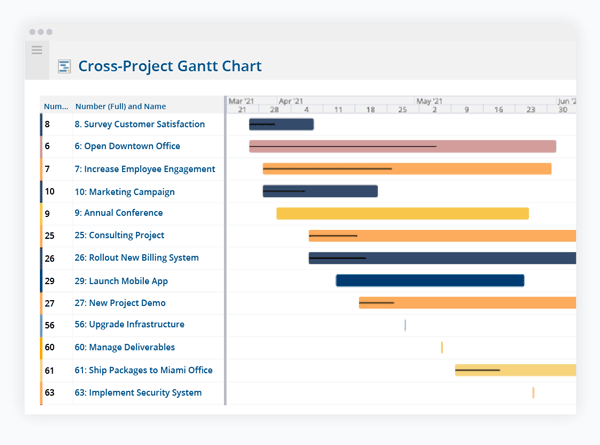
Project operations have a set timeline for all employees for the timely completion of the processes. This functionality allows managers to monitor if all the processes are being completed within the set deadlines, providing insights about team performance and predictions about the project completion date.
Through analytical reporting, all the operational metrics are analyzed for quick recognition of any gaps in the strategies, which can be timely resolved through prompt reporting features. Avengers can visualize the reports and adopt quick measures to solve the problems for streamlined project management.
This software is loaded with pre-made project templates that can be tailored according to your organization’s workflow, and allow better control over the project processes. This software allows users to modify the built-in templates and retain them for better reusability. This accelerates the processes and allows managers to focus on important things.
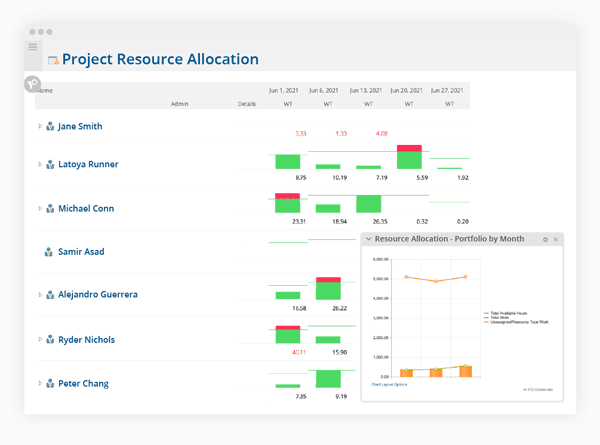
Resources and budget capacity are the components of any enterprise-level project that need active handling according to a project Insight review. Through straightforward and legible reporting, project managers are always aware of the expenditures and can easily centralize this data so the collaborators can also review it and strategize accordingly.
This easy-to-use tool empowers project managers to allot tasks conveniently and monitor the progress along the way. These aspects can enable the user to substitute team members and reposition team members according to their expertise. Through automation, all employees get notified about any alterations in the allotments and timelines of the project procedures. Scheduling can also assist in holding meetings on premises with lower no-show rates because of automated alerts.
To save time, these features can help in getting permission from the higher-ups promptly with automatically gathered information. Users can authorize certain individuals and assign their positions for streamlined managerial procedures. This creates a professional working environment among workers. Managers can save hours from their schedule and assign tasks, assign roles, launch strategies, and get approvals through robust automation.
See The Software In Action Watch Free Demo!
Top Recommended Software
Project Insight: Pros and Cons
Project Insight Reviews
Frequently Asked Questions (FAQs)
A: Certainly, Project Insight does have a free version.
A: Indeed, Insight Project is cloud-based.
A: The English language that Project Insight PM software supports.
A: The Project Insight system allows buyers to get answers through informative guides, chat assistance, phone support, FAQs, project Insight reviews, community, and email. You can also get details about Insight pricing.
A: Certainly, there is an Insight app that can be used on handheld devices. Apps provide the accessibility of using their functionality with no restriction on on-premises presence.
A: Of course, the REST API access is provided by Project Inisght PM.
A: Indeed, there is an Insight free trial option for 14 days, and a free Project Insight project management system demo. According to a Project Insight review, a free demo provides much information, but a trial helps the team familiarize itself with the software.
A: Certainly, iOS and Android handheld devices are supported by Projects Insight with a requirement for a login.
A: Indeed, the apps this Project Insight project management software integrates with are SAP, Salesforce, Basecamp, Box, Microsoft Teams, Sage, QuickBooks, etc.