
Overview
Businesses are always in search of a revolutionary software solution that matches the productivity of their organization and enables robust collaboration. Miro software is a smart project management product that is designed with AI-powered features to address your procedural requirements. This unique solution enables unhindered and smooth collaboration between team members for operational optimization. Managers can get the whole team aligned on one set strategy and notify them promptly of any modifications. Data sharing is secure with Miro, leaving no room for privacy breaches. If you are interested in providing structure to your project plans and operations, then opting for this software platform is the best decision.
Miro Software Specifications
What is Miro?
This intuitive cloud-based platform is deployed by businesses to manage all aspects of project management with utmost efficiency. Mid-sized, small, and startup businesses can leverage this software to empower managers with all the details to project progress. Miro provides reports about employee performance, project progress, and improvement strategies that might need to be implemented. Moreover, project leaders can also get equipped with resolved issues through AI-powered features. With prompt and quick decision-making, there are better chances of project success and business productivity. All team members are always aware of the ongoing updates in the project plans and can also comment on any process that needs to be changed. Increased team coordination is always highly appreciated by businesses.
What is Miro Used For?
There are certain components of this PM software that are the core reason for its popularity. Those features include the Miro dashboard, which can resolve the intricacies of your workflow in less time and effort. Another feature, known as a digital whiteboard, is totally automated and can provide ease of use, data visualization, informational alignment, increased team coordination, and dedicated project planning. Collaborators and stakeholders can conveniently provide feedback and valuable ideas for better project outcomes. Furthermore, its integration with Google Docs, Calendar, Google Meet, Google Sheets, etc, makes data exchange and updates easier, where the names of the members are also shown.
How Much Does Miro Cost?
The Miro pricing or monthly plans are offered by the vendors on the official website, including:
- Free plan: $0 per month
- Business plan: $20 per month
- Enterprise plan: Personalized Miro price according to the additional features
- Starter plan: $10 per month
The final Miro cost is usually dependent on the unique requirements of the businesses and user preferences. You can get in touch with the sales team and request a tailored Miro pricing quote that suits your budget capacity.
Miro Tool Integrations
More than 130 Third-party apps and tools integrations are supported by this PMO software solution, some of which include:
- Atlassian
- Microsoft Teams
- Webex
- Google Workspace
- Zoom
- Slack
You can also schedule a free demo to learn more about the integration, performance, functionalities, and features of this project management software.
Who Can Use Miro?
All scales of operations can leverage this PM product to revolutionize their managerial capabilities. Some diverse settings and industries that can be leveraged include:
- Education
- Information technology
- Research
- Project management
- Consulting
- Marketing
- Design and creatives
- Advertising
The purpose of the Miro collaboration platform is to be used by a wide array of industries without any hassle. If you are interested in knowing about Miro pricing, then click on the ‘Get Pricing’ option mentioned above.
Miro Project Management Application
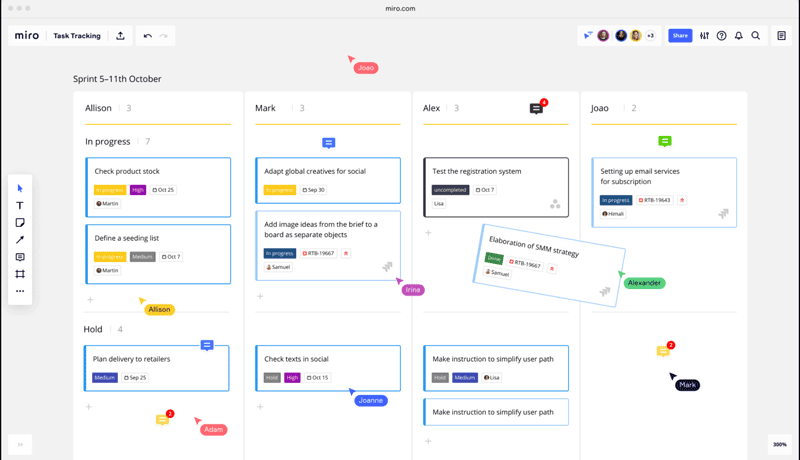
After installation, add your credentials for an authorized Miro login, then navigate to the intuitive dashboard. The Miro dashboard has multiple board options that can be used for different purposes, i.e, coordination and data sharing.
There is also an option of templates that can be utilized by project managers, which empowers them with no need to set up boards from scratch for strategic planning. Different boards can be identified by naming them, and data can be conveniently added to these boards. Core features such as coordination tools can be used to make the project operation streamlined, like email invites and assigning authorities. With powerful integrations, leaders can also hold virtual meetings with members and collaborators. Staff members can also visualize the comments of the leaders and cross-comment to curate better strategies. Users can also access educational material from the academy and get linked with other members through a community.
You can book a visual Miro software demo to get a better understanding of the application of its features in a business database.
Is Miro Project Management the Best Software?
In today’s competitive market, businesses cannot afford to settle for software that is not suitable for their project operations. Miro software is scalable and secure, which receives high appreciation from businesses, considering there is no room for leaked data in expensive projects. This platform accelerates your project processes with precision and improved planning. With more than 130 integrations, your collaboration capabilities can touch new heights. All the services and products delivered by your organization are ensured by this product, and also that they perfectly match your consumer requirements.
If you are interested in knowing more about the suitability of Miro mind mapping software for your business requirements, then contact our consumer assistance team. You can also read the unbiased Miro reviews and get tailored Miro software pricing.
Miro Software Features
All the data is safely stored in the database of this software. The security aspect of the Miro tool is top-notch and keeps the users stress-free about privacy breaches. It provides enterprise-level security to all the confidential information and Intellectual property. Informational exchanges are common among team members and collaborators, which is why this managerial aspect holds much importance. Furthermore, if data privacy is ensured, then there are fewer instances of hacking and unauthorized access to data editing.
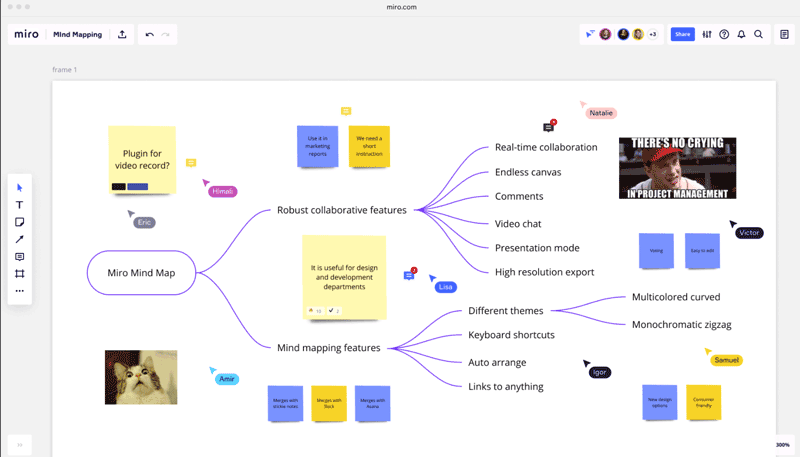
Miro whiteboard software enables superior project planning, allowing team members and leaders to coordinate on their innovative ideas. Through these boards, project staff will have a safe and convenient space to share their thoughts that can be used by managers. These tool allows the generation of mind mapping through comparisons of different ideas and implementing them in the actual project strategy. Project success can be ensured with this collaborative effort.
A Miro review reported this feature to be very convenient. Multiple boards are used by one organization, which makes it difficult to find a single content file through all of that mess, but not with the Miro collaboration platform. There is a search bar functionality that can be utilized by the team members to search for the information they need conveniently. Moreover, this centralized hub is already designed in such a way that viewing content and accessing old data involves no complexity.
This software can be easily used on handheld devices that provide the user with all the managerial capabilities with remote access. Teams and leaders can coordinate at their convenience. The devices that are supported by this software are laptops, tablets, desktops, and smartphones. With this, no one would miss crucial details about the project and related operations. All team members can interact through the diagrams, polls, sticky notes, and pin important messages.
This intuitive product provides users with built-in templates that can be modified according to their business needs and preferences. These templates save a lot of time for the user, eradicating the need to make a new template for every single project. Project managers can use these templates to design marketing campaigns, curate project strategies, and manage business operations. Optimization, efficacy, and consistent business outcomes can be ensured when there is a set operational handling structure.






Miro Pros and Cons
Pros
Easy-to-use, modifiable, and intuitive interface Convenient and easy to navigate the Miro dashboard Enhance team coordination through the Miro whiteboard tool Miro mind mapping software allows members to unleash their creativity Built-in templates that can be tailored and reused Managers and the team can communicate remotely through handheld devicesMiro Software Reviews
Frequently Asked Questions (FAQs)
A: Certainly, Miro software does have a free plan available, but there are certain restrictions on features.
A: Indeed, Miro software is cloud-based, and it enables the staff members to coordinate virtually.
A: English, Portuguese, German, Spanish, Polish, Korean, Japanese, and French are the languages that the Miro project management supports.
A: Miro Project management allows buyers to get answers through informative guides, help desks, 24/7 customer services, Miro reviews, FAQs, chat assistance, forums, and email. You can also get details about the Miro pricing.
A: Certainly, there is a Miro phone app that provides a workspace for convenient collaboration. Users can have remote access to the functionalities of this software platform.
A: Of course, REST API access is provided by the Miro collaboration platform.
A: Indeed, there is a complimentary Miro whiteboard software trial option and a free Miro software demo.
A: Certainly, iOS and Android handheld devices are supported by the Miro project management software, with a requirement for a login to access the Miro dashboard, according to a Miro review.
A: Indeed, the apps this Miro system integrates with are Google Workspace, Slack, Zoom, Atlassian, Microsoft Teams, Webex, etc.