

Overview
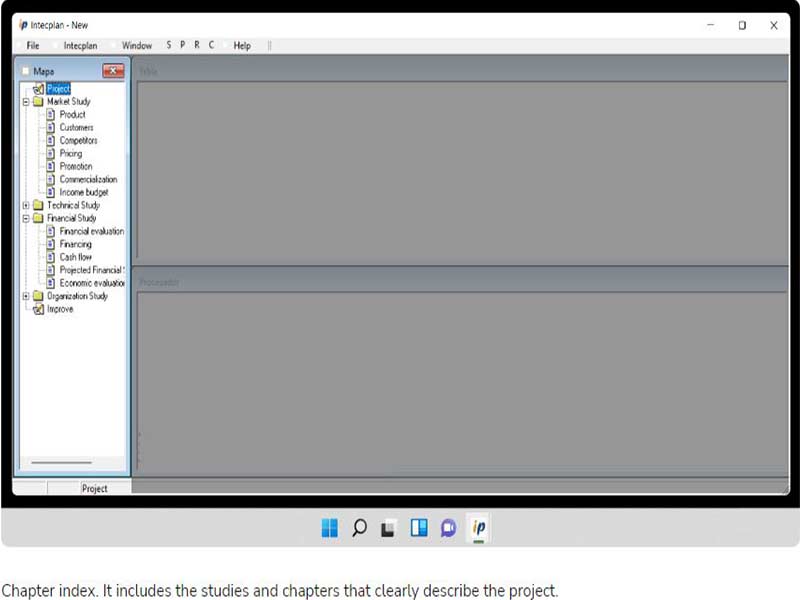
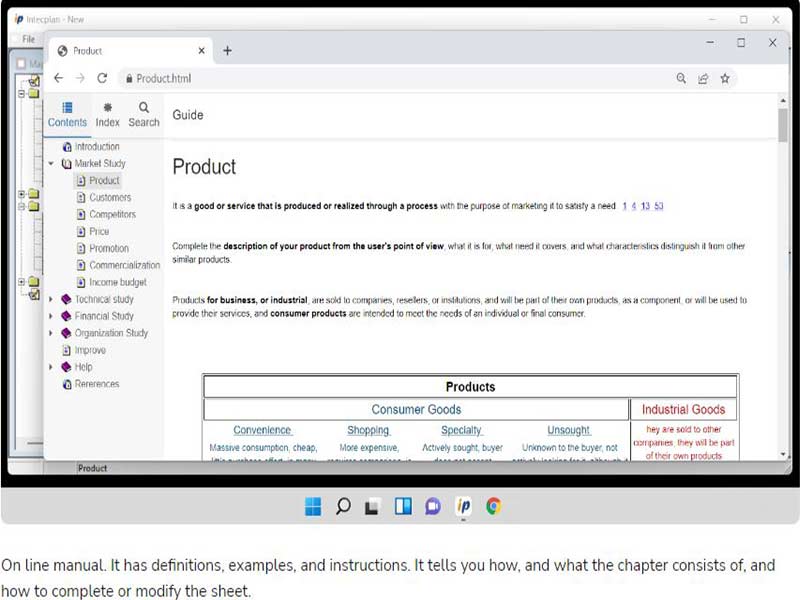
This business plan software can revolutionize business planning and project management capabilities. Intecplan has many powerful features that can ensure the long-term financial stability of companies. By incorporating this intuitive software platform into the project operations, you can simplify processes that include financial modelling, outcome-oriented decision-making, and efficient strategizing. Software beginners might face some difficulty in using the software, but the features are worth the effort.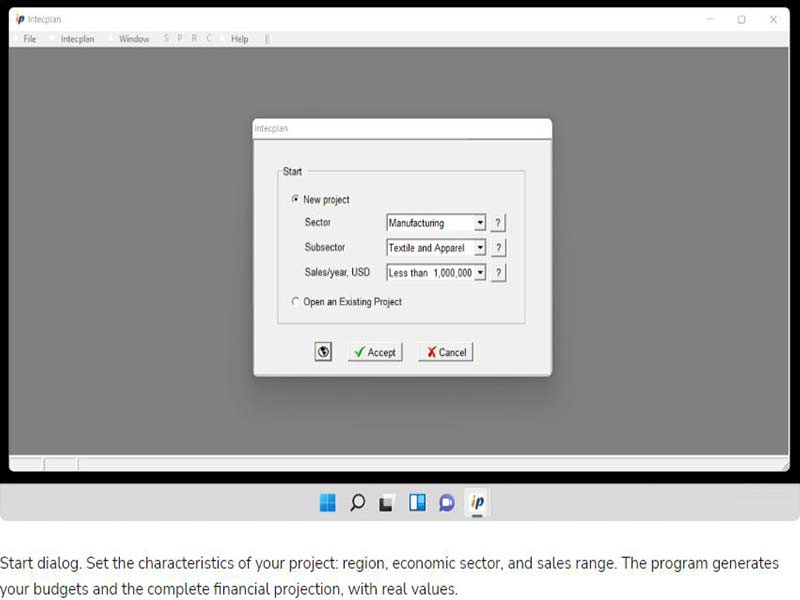
Intecplan Specifications
What is Intecplan?
This intuitive business plan software can be used for projects for investments through its cloud, Saas, and on-premises-based functionalities. Intecplan project management software can provide the means for effective strategic implementation, ultimately to enhance profitability and market share with minimal expenditure. This platform gives the project managers the needed insights that allow them to identify any gaps in the operational modules that can or are impacting the business’s profitability. This software can also empower businesses through financial modeling and sensitivity analysis that complements our decision-making.
Best Intecplan Usage
This project management software allows better budget control and task evaluation. Intecplan can also provide better drafting capabilities that significantly contribute to improved business planning. Managers can modify these drafts and use different functions like images, texts, tables, etc. With this software platform, none of the precious time will be wasted on repetitive tasks when every administrative duty is being managed precisely and efficiently.
Intecplan Integrations
Information about third-party app integration has not yet been disclosed on the official website by the vendors.
Intecplan Pricing
There is only one time expense for this PMO of $290. You can click on the ‘Get Pricing’ to learn more details about the Intecplan pricing.
Intecplan Users
All scales of operations and diverse industrial sectors can leverage this software platform. Large companies and small businesses can utilize this software for its robust capabilities in the following niches:
- Manufacturing
- retail
- Hospitality
- Logistics
You can book a free Intecplan demo to learn more about its functionalities.
How Does Intecplan Work?
After installation, add your unique credentials for an authorized Intecplan login and navigate to the dashboard. Users can manage the team members by assigning them tasks with set deadlines. Multiple project plans can be set comprehensively for operational efficiency. Finance managers can utilize this platform with multiple tools, like financial tools and personalized progress reports. These invoicing processing software tools let the managers organize the client data, invoices, budgets, resource allocation, and other expense-related details. Outcome-oriented decisions are the core of successful project execution, which is why this software provides reports on the progress by analyzing different operational aspects like task completion rates, team skills, and time zones.
You can watch a complimentary Intecplan demo to gain a visual understanding of the performance of this software in a business setting.
Is Intecplan the Right Project Management Software?
Companies that are looking for business plan software can choose this smart platform. This solution provides many features that are required by many businesses, including task dependencies, intuitive dashboards, timeline monitoring, and Gantt charts. Intecplan gives you the reins with its modifiable templates, which can be edited to suit different industrial projects. Moreover, this project management software is highly scalable and matches the productivity of your business, eliminating the requirement of purchasing more PMO systems.
You can get in contact with our customer support team to learn whether or not this platform is suitable for your unique business operations. You can also watch the complimentary Intecplan demo and read the unbiased Intecplan reviews.
Intecplan Features
This feature allows the project managers to track the timelines of the team members and project processes. Through this, employee skills can be evaluated by monitoring the task completion rates and the time spent on it.
Project managers assign tasks to the team members according to their capabilities and skill level. These powerful features can conveniently manage the resources that are crucial for avoiding unnecessary expenditure. Team leaders can easily schedule meeting spaces and required equipment.
This business plan software enables convenient project management through task allotment with set deadlines, completion monitoring, budget control, and completion status verifications. From these, efficient project planning can be done. Leaders can also generate Gantt charts to effectively control operational aspects.
Intecplan software is a unified platform that empowers businesses with predicting risk factors through detailed operational analysis. Employees can use this tool to report issues, generate reports on the problems, and monitor procedures after improving the workflows.
Reporting is the core requirement of any company because it analyzes the processes, progress, and team performance related to the project. Project leaders can gain access to the business insights from detailed reports. Through these reports, the room for improvement can be identified and filled proactively.
Business employees can store all the project-related documents in a centralized location without the risk of privacy breaches. All team members associated with the same project can have all-time access to these files. Furthermore, members will be notified about the updates in these documents, leading to synchronization.
See The Software In Action Watch Free Demo!
Top Recommended Software





Intecplan Pros and Cons
Intecplan Reviews
Frequently Asked Questions (FAQs)
A: Certainly not, this PMO does not have a free plan available.
A: Not entirely, the Intecplan project management is web-based.
A: English, Italian, French, Portuguese, and Spanish are the languages that the Intecplan project management software supports.
A: Intecplan invoicing software allows buyers to get answers through the help desk, Intecplan reviews, FAQs, knowledge base, and email. You can also get details about the Intecplan pricing.
A: There is no Intecplan App that provides convenience as an invoice processing software. Users can have desktop access to the functionalities of this software platform through a single Intecplan login.
A: No, the Intecplan API is unavailable.
A: There is no complimentary Intecplan trial option, but you can request a free Intecplan demo.
A: No, mobile devices are not supported by this project management tool. Through an Intecplan login, you can access the dashboard on a PC.
A: There is no Intecplan integration information available on the website.
