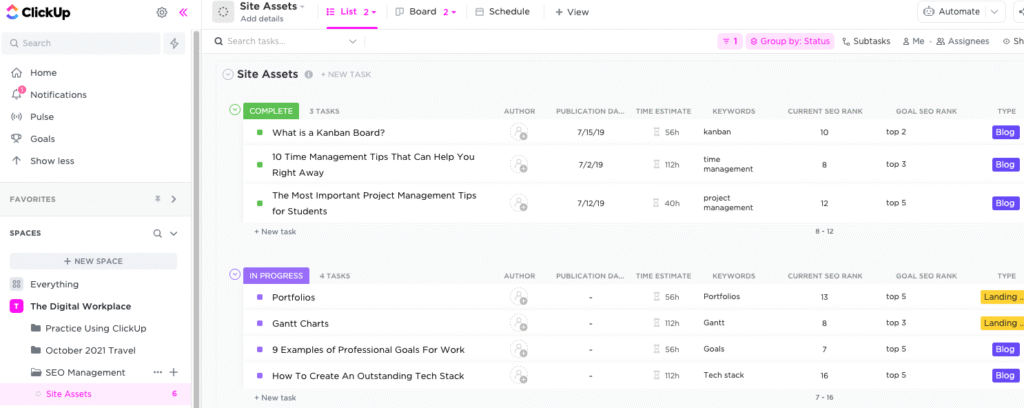
This is an intuitive cloud-based platform that can improve the managerial capabilities of businesses. ClickUp project management is a centralized hub that caters to the requirements of diverse industrial sectors and sizes. This PM product can be the best replacement for physical efforts through AI-powered features and robust automated workflows. Furthermore, this is the solution to all the problems that can be faced by project managers, like inefficient team coordination, manually allotting tasks, superficial monitoring, and failing to deliver real-time alterations in teh project strategies. However, there is no need to stress about these anymore with the ClickUp digital product workflow.
This PM tool can empower teh users with features like efficient synchronization, automated task handling, simplifying operational intricacies, and real-time progress reporting.
Purpose of ClickUp AI
This smart software is designed to provide project leaders with ease of use and can be utilized by diverse industries. ClickUp HIPAA is highly appreciated by the healthcare industry. This is a unified tool that can accomplish everything in less time and keep the entire workplace synchronized, ensuring the project’s success. The interface of this software is flexible and can be personalized according to the workflow requirements and user preferences. It also saves a lot of money when there is no need to get more software, as everything is being managed by a single software solution. This product also scales as your business grows, eradicating the need for getting an additional system that would be more time-consuming to learn.
How Much Does ClickUp Cost?
Businesses’ needs and sizes usually influence the cost of these software platforms. There are four plans of ClickUp pricing offered by the software vendors:
- Enterprise: Personalized ClickUp pricing
- Unlimited: $10/month/user
- Business: $19/month/user
- Free Plan: $0/month/user
You can get in contact with the sales team by clicking on the ‘Get Pricing’ option. Request a tailored ClickUp pricing quote that suits your company’s budget capacity and unique requirements. There is also a 14-day free trial option.
ClickUp Project Management Users
ClickUp project management software can be leveraged by a diverse range of industries and organizational sizes. From small businesses, startups, or mid-sized companies to large enterprise-level organizations, this PM product can manage it all.
- Human resources
- Marketing
- Design
- Engineering
- Software development
- Operations
There is no ClickUp alternative in the software market when it comes to robust AI-powered features. If you want to know more about the functionalities of this software platform, then book a complimentary ClickUp demo.
ClickUp Integrations
Third-party apps and tools integrations are supported by the ClickUp API, which includes:
- Harvest
- GitHub
- Slack
- HubSpot
- Slack
- GitLab
You can book a ClickUp demo to learn in-depth about ClickUp integrations, performance, and features. A visual representation is enough to equip the purchaser with all the necessary knowledge needed to make a purchase decision.
ClickUp Applications
After installation, you can add your unique credentials for an authorized ClickUp login, then navigate to the intuitive dashboard. After navigating to the ClickUp home, you can start managing the files related to the projects feasibly through workspace creation. There is no hassle in trying to access these workspaces because you can provide the identification elements like different names, avatars, etc. There is more to the managerial aspects; you can perform task allotment, create task spaces, provide deadlines, and sort them according to priority. Users can easily invite collaborators through this software, even from other projects, which makes it easier to strategize about new projects. Project managers can conveniently automate repetitive tasks so that the team members can meet the provided deadlines on the assigned tasks. There is also an option of putting colourful tags on the tasks that need to be done on a priority basis, so the project operations can get streamlined.
If you want to know more about how to perform a ClickUp login with no hassle, then book a free ClickUp demo that explains everything you need to know. You can also get in touch with our sales team to get a tailored ClickUp pricing that suits your company’s workflow.
Is ClickUp The Best Choice?
Your search for the best PM software solutions ends here, as there are no ClickUp alternatives in the market when it comes to powerful automation. This software solution handles all operations and processes related to all ongoing projects for a single business. This smart product allows unhindered collaboration among the team members, which helps in the optimization of the project procedures. Furthermore, the ClickUp app assists with remote access through progress reports and timeline management. Data sharing is the main aspect of project processes, and it needs to be secure, which this software ensures through end-to-end encryption. There are many features like scheduling, third-party App ClickUp integrations, personalizations, and task management.
If you still have doubts about this PM tool, you can get in contact with our customer support team and get details about its suitability for your business workflow. There are also certain uses of ClickUp as a CRM, according to certain ClickUp reviews. You can also watch a free demo and get tailored pricing plans.