MedPointe EMR Features

Explore what MedPointe EMR Software offers — from day-to-day workflows to advanced capabilities.

4 features

Smarter Clinical Documentation

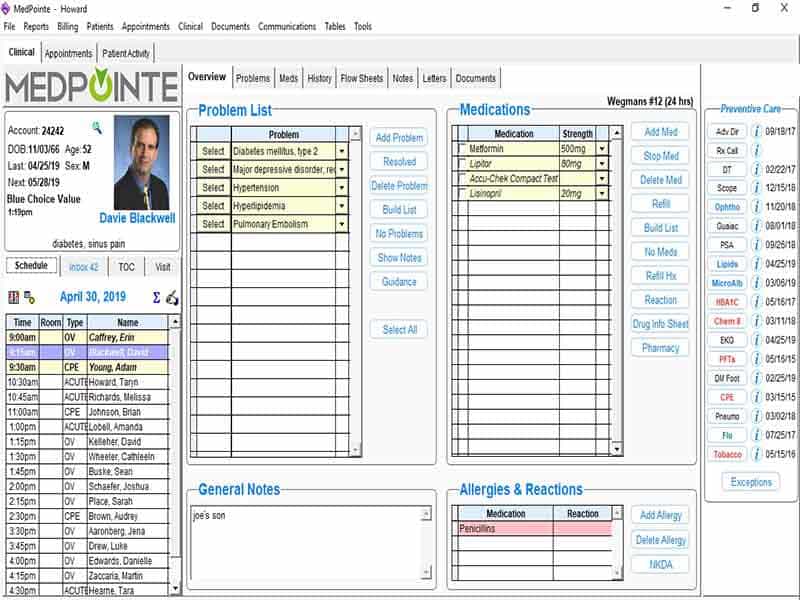
MedPointe’s documentation engine reviews similar past encounters and drafts a new note from the closest relevant case. Providers edit from there instead of typing from scratch, which cuts clicks and keeps notes consistent across visits.

Connected Revenue and Claims Management

The system checks patient eligibility, sends claims on the same day, finds claim errors, posts payments, and prepares accounts receivable reports. Its clearinghouse also lets staff track claims as they move through the billing process and handle secondary billing without signing in to another system.

Configurable Practice Workflows

Teams can build their own workflows, edit templates, create treatment plan formats, and generate tailored reports. 

Telehealth

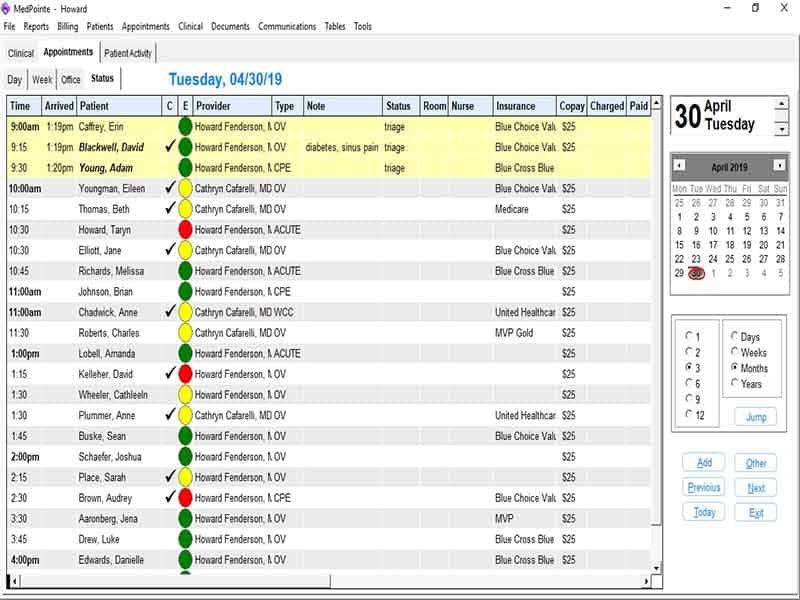
The software allows patients to book appointments and view their medical records. MedPointe also uses Zoom for virtual visits. Staff can manage intake forms, patient consent, visit notes, reminders, and billing through the same record used for in-person appointments.

What is MedPointe EMR?

MedPointe EMR is a cloud-based system that brings patient records, scheduling, billing, messaging, and reporting together in one system for medical practices.

Because it works through a web browser, staff can log in from various devices.

MedPointe EMR Pricing and Benefits

The MedPointe pricing depends on users and features, payment processes, video visits, data migration, or custom changes.

The system confirms eligibility, exchanges claims, records payments, and prepares reports. Staff can use the integrated clearinghouse to follow claim status and process secondary claims without switching to another platform.

Want to organize your clinic operations? Get your demo with the Codatis team today!

MedPointe EMR Target Audience

  • Primary care providers who want connected clinical and administrative workflows
  • Specialty practices that need custom templates, reports, and treatment plans
  • Independent and multi-provider practices looking for one EHR and practice management platform instead of several
  • Teams that want billing, claims tracking, and insurance verification built into the same system as charting
  • Practices migrating patient records from an older or outgoing system
  • Providers running both in-person and virtual appointments

MedPointe EMR Integrations

  • Zoom powers video visits, with online intake, electronic consent, documentation, and billing tied to the same appointment
  • Bidirectional lab connections support lab ordering and result delivery straight into the chart
  • Health information exchange tools support electronic referrals and patient data sharing between organizations
  • The built-in clearinghouse connects with a wide payer network for claims submission, status tracking, and remittance posting

Practices that also want a deeper look at revenue cycle management software options can weigh MedPointe’s built-in against a dedicated standalone RCM platform, depending on how much billing volume the practice handles.

Choose This for Certified Compliance and Connected Clinical and Revenue Workflows

Choose this category of platform when your practice wants one system handling both patient care documentation and the billing that follows it. Choose MedPointe specifically if you want an EHR that adapts to how your practice already runs, instead of forcing staff into fixed templates, while staying certified for federal compliance requirements.


Documentation Included
Patient histories Included
e-prescribing Included
Custom templates and reporting Included
Scheduling Included
Reminders Included
Patient portal Included
Secure Messaging Not included
Document routing and analytics Included
Claims tracking Included
Payment posting Included
Telemedicine workflow Included

Pros

5
  • Combines certified EHR and practice management functions in one system
  • Cuts repetitive documentation through note drafting from past encounters
  • Supports custom templates, workflows, reports, and data migration
  • Connects patient care, telemedicine, billing, and claims under one record
  • Provides revenue cycle analytics and compliance monitoring in the same dashboard

Cons

4
  • Licensing scales with provider count, so cost rises as a practice adds clinicians
  • Device compatibility has been reported as stronger on Mac and iOS than on other operating systems
  • The public integration list doesn't name every connected lab, pharmacy, or payer, so practices should confirm specific connections before switching
  • Buyers should confirm which services are bundled into a quote and which require separate setup

MedPointe EMR Software Reviews

Overall Rating

4

2 Review(s)

Rating Distribution

5

(0)

4

(2)

3

(0)

2

(0)

1

(0)

Share your experience

John S.

Consulting

Ease of use
8
Value for money
8
Customer Support
7
Functionality
8

My software review

Pros

The platform has been a dependable part of our daily operations. It handles core tasks smoothly and keeps everything organized without adding complexity.

Cons

Limited advanced customization options.

Damian K.

Technology

Ease of use
8
Value for money
9
Customer Support
7
Functionality
8

An excellent System

Pros

The software offers a good mix of features that support our workflow and improve efficiency. It covers most of our needs, though there are occasional areas where improvements could enhance usability. Still, it delivers solid value for the price.

Cons

Occasional lag in updates or syncing.

Frequently Asked Questions

MedPointe is a certified EHR with practice management functions built in. It also covers standard EMR needs like charting, records, and scheduling.

Pricing runs as a monthly license scaled by provider count. Costs vary by team size and added services, so request a current quote.

Yes. It runs video visits through Zoom, connected to scheduling, intake, consent, documentation, and billing.

Yes. The portal covers scheduling, secure patient messaging, and record access.

Yes. Practices can set up workflows, templates, reports, and scheduling rules to match how they already operate.