Empower EMR Software Features

Explore what Empower EMR offers — from day-to-day workflows to advanced capabilities.

5 features

Patient Data Management System

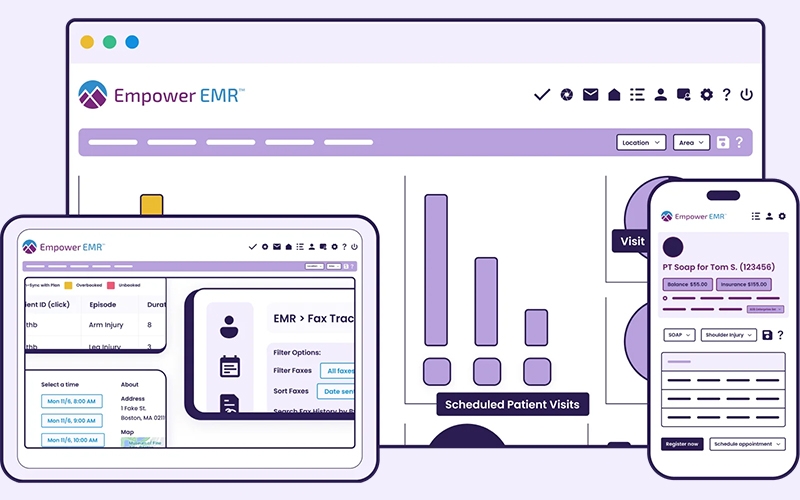
Empower EMR Software centralizes all patient records in a secure electronic health record (EHR) software system. It stores medical history, diagnoses, medications, allergies, lab results, and treatment plans in one place.

This helps providers reduce manual paperwork and quickly access complete patient information during consultations. It also improves decision-making by giving clinicians a full view of long-term patient health data.

Telemedicine and Virtual Care Tools

The platform includes built-in telemedicine features that support secure video consultations, remote diagnosis, and follow-up care.

Using EHR software integration, providers can access patient records during live sessions, update treatment plans in real time, and prescribe medication digitally. This improves care delivery for patients in remote or underserved areas while reducing in-clinic workload.

Billing and Revenue Cycle Management

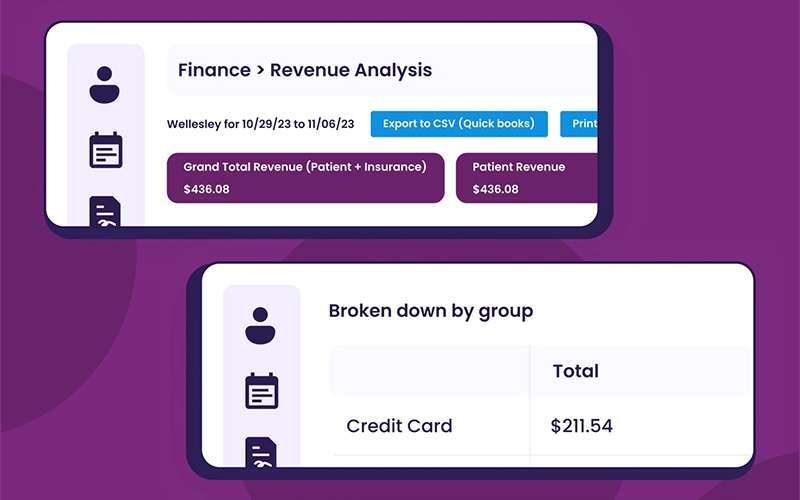
Empower EMR Software automates billing workflows, including claim creation, submission, and payment tracking. It reduces manual entry errors and improves reimbursement accuracy.

The system supports end-to-end revenue cycle management, helping clinics track unpaid claims, manage insurance processing, and improve financial visibility. This makes it a strong EMR/EHR software solution for revenue efficiency.

Patient Engagement Portal

The patient portal gives individuals secure access to their health information, including prescriptions, lab results, visit summaries, and upcoming appointments.

Patients can communicate with providers, request refills, and schedule visits online. This improves engagement and strengthens patient-provider communication, a key factor in modern EHR systems and medical EHR software adoption.

Referral Coordination System

The referral system allows providers to digitally send, receive, and track patient referrals across specialists and healthcare facilities.

It reduces delays in care transitions and improves coordination between primary care physicians and specialists. All referral data stays linked to the patient’s electronic health record ehr software, ensuring continuity of care and better clinical outcomes.

What is Empower EMR Software?

Empower EMR Software is a cloud-based EHR software for mental health, primary care, and multi-specialty clinics. It combines electronic health records, telehealth tools, and billing automation into one system.

The platform helps healthcare providers:

  • Store and manage patient records securely
  • Conduct virtual consultations
  • Track treatments and medical history
  • Improve coordination between care teams

In simple terms, Empower EMR replaces paper-based systems and disconnected tools with a centralized digital platform.

Empower EMR Pricing

Empower EMR pricing depends on practice size and selected features.

A typical pricing structure includes the following:

  • Basic Plan starting around provider-based monthly pricing
  • Advanced Plan with additional billing and e-prescribing tools
  • Enterprise Plan with custom pricing for large healthcare networks

Empower costs vary based on integrations, the number of providers, and customization needs.

Healthcare providers can request an Empower EMR demo to get a customized pricing estimate.

Who uses Empower Software?

Empower EMR Software is used by a wide range of healthcare professionals:

  • Primary care physicians
  • Behavioral health specialists
  • Hospitals and clinics
  • Emergency medical services
  • Long-term care facilities
  • Home healthcare providers
  • Pharmacies

It supports both small practices and large healthcare organizations that need scalable EHR systems.

Empower EMR Integrations

Empower EMR Software integrates with key healthcare and payment tools:

  • Stripe for payments
  • SureScripts for prescriptions
  • DoseSpot for e-prescribing

These integrations help improve automation, reduce manual errors, and support better financial and clinical workflows.

How Does Empower EMR Software Work?

  1. Log in using your Empower EMR login credentials
  2. Access your dashboard to view appointments and patient updates
  3. Start a telemedicine session using secure video tools
  4. Open patient records to review medical history
  5. Create prescriptions using integrated eRx tools
  6. Manage billing and claims through the revenue cycle system
  7. Set appointment schedules and automate bookings
  8. Customize workflows using clinical templates

This workflow improves efficiency and reduces delays in care delivery using medical EHR software tools.

Choose Empower EMR Software for Scalable Healthcare Operations and EHR Systems Efficiency

Choose Empower EMR Software if you need the following:

  • A scalable best EHR software solution for growing clinics
  • Secure telemedicine and virtual care tools
  • Integrated billing and claims management
  • A centralized EHR electronic health system
  • Strong patient engagement through portals and messaging
  • A system that reduces administrative workload

It is especially useful for providers moving from paper records or outdated EMR/EHR software systems.

Appointment scheduling and calendar management Included
e-Prescriptions and medication management Included
Lab integrations and reporting Included
Patient portal access Included
Mobile access for providers and patients Included
Telemedicine and virtual consultations Included
Billing and invoicing system Included
Claims management support Included
Customizable clinical forms Included
Patient demographics and records management Included
Workflow automation tools Included

Pros

5
  • Strong electronic health record (EHR) software capabilities
  • Integrated telemedicine tools
  • Secure prescription management system
  • Efficient billing and claims processing
  • Scalable for different healthcare sizes

Cons

2
  • Customization options can be limited for advanced workflows
  • Implementation may take time for large organizations

Empower EMR Reviews

Overall Rating

4.7

6 Review(s)

Rating Distribution

5

(4)

4

(2)

3

(0)

2

(0)

1

(0)

Share your experience
Laura P.

Consulting

Ease of use
8
Value for money
9
Customer Support
8
Functionality
10

Easy EMR for Beginners

Pros

Works as emr ehr software Simple navigation

Cons

Not ideal for large practices and Limited automation tools

Chris M.

Manufacturing

Ease of use
8
Value for money
9
Customer Support
9
Functionality
10

Functional but Basic System

Pros

Handles core EMR tasks and Supports ehr systems

Cons

Lacks advanced analytics and No strong customization

Natalie F.

Manufacturing

Ease of use
9
Value for money
9
Customer Support
9
Functionality
10

Simple EMR with Core Features

Pros

Strong reporting dashboard for clinical data

Cons

Setup takes time for new users

Frequently Asked Questions

Empower EMR Software is used for managing electronic health records, telemedicine, billing, and patient engagement in healthcare organizations.

Empower pricing depends on the plan selected, provider count, and required features. Custom pricing is available for enterprises.

Yes, Empower EMR supports small clinics with scalable tools for scheduling, billing, and patient record management.

Yes, it includes integrated telemedicine tools for secure virtual consultations.