Trello Software LogoTrello Software

Overview

Trello is a modern project management solution developed on a Kanban approach. It makes it agile and user-friendly Project Management software. It offers task management in various ways through lists, cards, and boards to streamline and track workflow. To promote productivity, it offers Butler assistance that helps eliminate repetitive tasks. Ultimately, it makes it convenient for freelancers, start-ups, and small- to mid-sized teams looking for flexibility and a visual workflow tracker. Watch a free Trello Demo of the software to learn more about its different features.

✓ Free, no-obligation quote✓ Response within 24h✓ Cloud-based
Software Logo
Trello SoftwareClick to flip or scroll
codatis.com/trello-software/
Live
Trello Software preview

What is Trello Software?

Trello is a leading project management software that offers flexible team collaboration. It allows users to create cards, lists, and boards to manage their tasks, events, and workflows. This platform is designed by Atlassian to offer users customization options to manage things at their convenience. Also, it has features like automation, templates, and integrations that make it a strong choice for all types of businesses. Its pricing is also budget-friendly

How much does Trello cost?

This solution’s pricing plans vary based on business requirements. Along with the Trello free plan, it comes in three different packages for organizations. They are:
  • The Standard Plan - it is utilized mostly by individuals and they are charged $6 per user.
  • Trello Premium - this plan unlocks new features and starts at $12.50/user/month.
  • The Trello Enterprise Plan provides annual billing options by giving access to advanced tools. An estimated pricing structure for 50 users is $17.50/user/monthly with yearly billing.
Contact our experts for more guidance and a Trello price breakdown recommended for your business. Note: The pricing is subject to change 

Trello Software Integrations

Teams can connect the platform with their existing tech stack to power up daily routines. Some of them include these third-party integrations:
  • Jira
  • Slack
  • Miro 
  • Gitlab
  • Timely
  • Clockify
  • Everhour
  • Bamboo Metrics
  • NetCrunch
  • Pomello
  • Zapier
  • Freshdesk

How to use Trello for project management?

Sign in to Trello to use the dynamic features of this software product. Follow the instructions to navigate the dashboard:
  • Log in to your account using the credentials provided to you by your administrator.
  • Click the “Create board” option on the Home screen to get started.
  • Name it with your project goal and purpose.
  • Add lists to your boards, indicating different stages of workflow.
  • Create Trello cards for every task to track and add them to their respective lists.
  • With drag-and-drop features, add done cards to the list after task completion. This helps with progress tracking while staying organized.
  • As a professional, you can also add checklists, deadlines, attachments, and comments to cards to keep the information required to track tasks.
  • Add and monitor additional tasks in your Trello project management workflow throughout the project lifecycle.

Is Trello PM A Good Choice For You? 

Businesses should opt for Trello software if they actually want to manage their projects efficiently. It facilitates tracking, project management, and improved team collaboration within and across distributed locations. It also has strong integration and automation options. The software product has a compelling dashboard that keeps you and administrators updated about outcomes through lists, cards and boards. The platform is also secure and compliant with GDPR. Also, it has access control to offer the best solutions as a centralized hub. If you are skeptical about making a choice, then you can read Trello reviews to clear the air and make an informed decision.
Category:Project Management Software

Trello Software Functionalities

4 Features

Features

  • 1PluginsYou can power up the efficiency of this software product by linking it with your favorite external tools. It does not require any hard-and-fast technical expertise and actually cost-effective upgrade to your tool for a better workflow.
  • 2Project Management TemplatesTrello offers easy and customizable templates by industry leaders to make the workflow better. It saves new users’ time and helps them set up an account quickly. These templates come with tried-and-tested blueprints for projects.
  • 3AutomationWith Butler automation, repetitive tasks will be handled by AI to reduce manual work and save more time. It also allows users to prioritize tasks to meet deadlines on time.
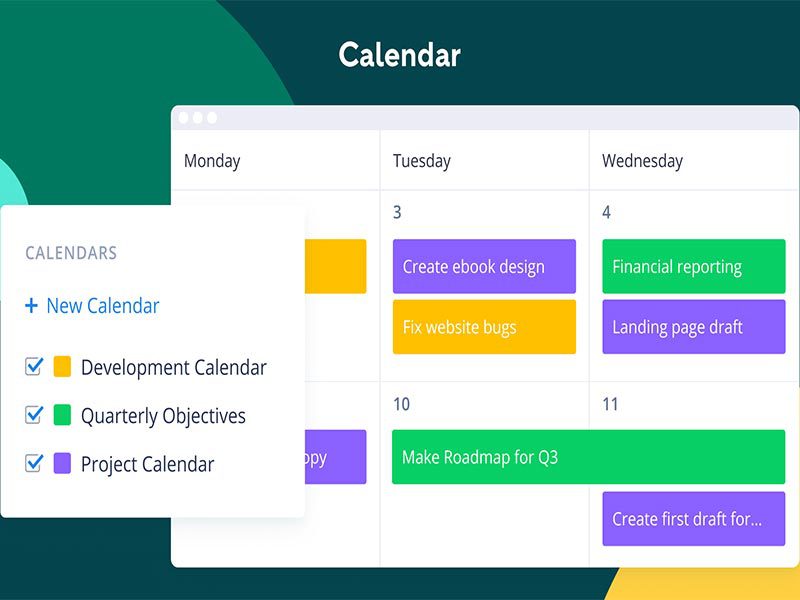
  • 4ViewsThis feature allows you to see the tasks of your team from different perspectives, like lists, calendar, boards, cards, etc. All resources from different locations can share contexts and information to be on the same page.

Specifications & System Details

Included

Task ManagementIncluded
Time TrackingIncluded
Project TemplatesIncluded
Mobile AppIncluded
Budget ManagementIncluded
Employee ManagementIncluded
DashboardIncluded
Project SchedulingIncluded
Resource AllocationIncluded
Analytical ReportingIncluded

Pros & Cons of Trello Software

Pros

7 points
  • 1The interface of this project management solution is visually appealing
  • 2Users can drag and drop options to update their work, making it easy to use.
  • 3Real-time tracking and progress management.
  • 4For improved collaboration and brainstorming ideas, the meeting feature is the best of all.
  • 5Timeline view is available to identify planning gaps and improve workflow strategies.
  • 6Diverse layouts for information sorting.
  • 7Trello project planning is exceptional.

Cons

2 points
  • 1Reviews of Trello stated that its initial navigation is slightly challenging.
  • 2Advanced features are limited in this PM software.

Trello Software User Reviews

No verified reviews yet

No verified user reviews yet for Trello Software. Be the first to share your experience.

FAQ's

Frequently Asked Questions about Trello Software

Yes, the solution offers a free version with no time limitation. It includes all Kanban features, but the free Trello plan comes with restricted user caps.

Trello is available on mobile phones, offering convenience to its users.

You can only have 10 boards and collaborators per workspace. Also, users get 250 automations of Butler Assist.

It is a shared hub that connects you with your team, projects, and collaborators, like an office setup but virtually.

Trello project management tool serves various industries of all sizes. They mostly include marketing and advertising, consulting, non-profits, and Software development.

Popular Alternatives to Trello Software

9 comparable products in this list

All Project Management Software →
FeaturedCompare

Asana Software

Asana is a popular work management tool, best suited for teams with a lot of moving projects. It helps with project planning, assigning roles, and monitoring progress. Compliance, marketing, and research teams are among its leading users, but marketing teams benefit the most through the multi-channel campaign coordination feature. Users have appreciated the organization of the platform, but external coordination has drawn slight criticism. This solution does not impose a single framework and allows a digital workspace that connects individual tasks with strategic goals of businesses. This makes it a good option for companies with multi-departmental workflows. Want to explore further features in detail? Get a quick Tutorial for Asana from our website. See the software in action!

FeaturedCompare

Jira Software

This versatile cloud software was first developed as a bug tracker. Later on, it evolved into a powerful project management solution. Atlassian Jira Software was designed to track performance and make sprints for better project handling. The solution does support customization of work routines, offering unmatched flexibility. Its tiered pricing becomes costly as team size and requirements grow. We recommend it for growing businesses that require more complex features for efficient project management than a lightweight digital tracker. To see the software in action. Contact us to book a free Jira demo and explore its capabilities and learn how it can be valuable for your business.

FeaturedCompare

monday.com Software

The software is a web-based project management solution. monday.com relies on continuously updated cloud deployments. It brings multiple tools under one roof, including automation, external tool linking, and reporting dashboards. It is considered most useful for small businesses, as they do not have a complex framework that takes lots of time to set up and then automate. Would you like to know more about its specialties? Request a Free Monday demo to see the software in action. Contact us!

FeaturedCompare

Miro Software

Businesses are always in search of a revolutionary software solution that matches the productivity of their organization and enables robust collaboration. Miro software is a smart project management product that is designed with AI-powered features to address your procedural requirements. This unique solution enables unhindered and smooth collaboration between team members for operational optimization. Managers can get the whole team aligned on one set strategy and notify them promptly of any modifications. Data sharing is secure with Miro, leaving no room for privacy breaches. If you are interested in providing structure to your project plans and operations, then opting for this software platform is the best decision.

FeaturedCompare

FreshBooks Software

FreshBooks is the most opted-for software platform for small businesses. This smart platform can easily break down the complexities of project management into pieces that can be worked on easily. This product is popular among freelancers due to its ease of use; there is no need to spend a large amount of time trying to figure it out. A centralized hub that can do it all to empower your business is a gold in this competitive industry. It is famous for its invoicing, billing, and payment collection capabilities, along with other managerial aspects. Moreover, businesses can also monitor timelines, invoices, and expenses with no hassle. FreshBooks for small businesses is very simple to learn and can revolutionize your business's financial management in less time and more efficiently.

FeaturedCompare

ClickUp Software

Organizations that require software that can provide a unified platform for managerial purposes should consider ClickUp. This powerful project management software can simplify the project operations and keep the team members on the same page. Businesses can observe noticeable improvements in the management aspect of their overall processes. This intuitive software platform can empower team members working on the same project with real-time updates, coordination with managers, and modifications in the project planning. Project managers can automate repetitive routine tasks so employees can focus on important project-related duties. Moreover, leaders can have an informed idea about the project's success rates with detailed progress reports. You can check out the integration capability of this software platform by searching for clickup.com.

FeaturedCompare

Confluence Software

Businesses incorporate this software platform in their existing database for better synchronization among the team members across the project. Coordination is a massive need for optimized project processes because there are diverse operations that comprise a single project, especially at the enterprise level. Confluence software is a platform that provides a unified project platform that assists teams working on the same project, which can accelerate progress rates, leading to quick completion. Many industries can leverage the robust capabilities that come with this product, which assist the relevant business in achieving the reputation it deserves in the market.

FeaturedCompare

Wrike Software

This software product is opted for by organizations to revolutionize their workflow capabilities and to keep the team synchronized. This intuitive platform can help managers achieve optimal results when it comes to all of their running projects, considering its managerial features. Wrike project management can easily revolutionize the coordination among the managers and staff members, so there is no communication gap. This PM software optimizes the workflow by monitoring all components relevant to the project operations and curating detailed reports. These reports are observed by the project managers, and the performance gaps are recognized. After addressing all the issues, unhalted productivity can be observed. If you are interested in knowing more about the features of Wrike PMO, then read this guide.

RecommendedCompare

BigTime Software

BigTime is time tracking, billing, and project management software built for professional services firms like accounting practices, engineering firms, consultancies, and law office