

Overview
Workzone is a project and collaboration management system popular among many businesses. This platform organizes and aligns the workforce with the project operations, which is the core of a streamlined workflow. A synchronized team is important for workflow optimization and enabling the team members to meet deadlines. This software can be beneficial for client satisfaction when the project is executed within the estimated time zone.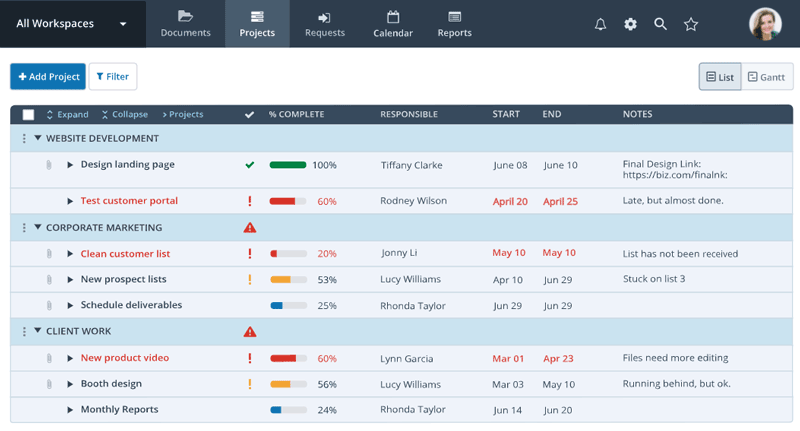
Workzone Software Specifications
What is Workzone?
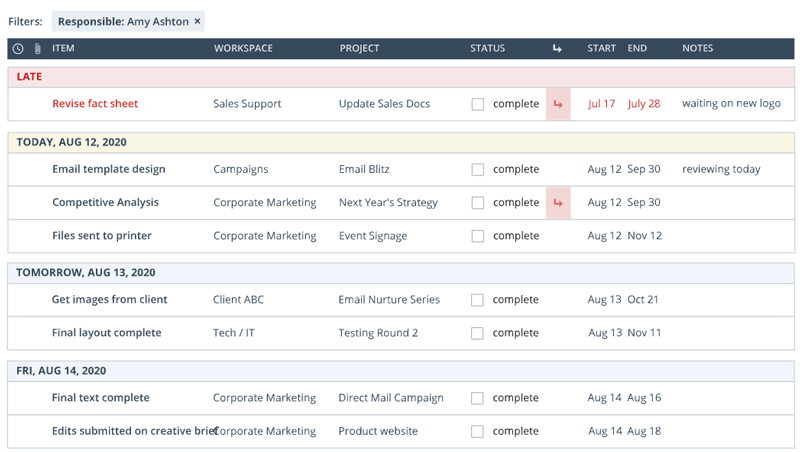
This project management software is a unified system designed to manage teams, project operations, deadlines, and intakes. Workzone software enhances the team’s capabilities to meet set deadlines through robust collaborations. Teams can conveniently visualize their portfolio and observe priority tasks with deadlines from a centralized platform, allowing them to begin working without needing someone from administration to notify them. Managers can monitor all project operations, handle files, and allow communication through a user-friendly interface.
What is Workzone Best For?
There are plenty of features that make Workzone PM software a great choice. The best feature is its user-friendly dashboard, which provides an overview of all ongoing tasks, completion rates, and overdue duties. Moreover, the interface of this software is highly modifiable, enabling the user to give branding elements for cohesion. Those elements can include color schemes, logos, and view layout.
Workzone Integrations
Third-party apps and tools integrations are supported by this PMO software solution, which includes:
- Dropbox
- Slack
- Google Drive
- Harvest
- Quickbooks Online
- Salesforce
Workzone Pricing
There are three Workzone pricing plans offered by the vendors:
- Professional
- Enterprise
- Team
The difference in pricing depends on certain aspects that include business requirements, organization size, user preferences, user volume, and budget capacity. You can get a tailored Workzone cost quote according to your unique company’s requirements by clicking on the ‘Get Pricing’ option mentioned above.
Who Can Use The Work Zone?
All scales of operations can leverage the Work Zone to the fullest from diverse industries like:
- Nonprofits
- Manufacturing
- Healthcare
- Real Estate
- Financial Services
- Retail
- Professional services
How Does SAP Workzone Perform?
After installation, add your unique credentials for an authorized Workzone login and navigate to the smart dashboard. Users are free to generate as many project files as required. For increased collaboration, users can invite members to a centralized location and allot them tasks with set deadlines. Team members can coordinate with managers and other members for better synchronization and report any issues. Managers can share important documents without having to send them individually, allowing team members to access crucial details without privacy breaches. Lastly, Managers and administrators can have all the monitoring capabilities through the analytical reporting features.
If you want to have a deeper dive into the performance of this project management software, then schedule a free Workzone demo today.
Is Workzone Software The Right Choice?
Organizations that require a system that can transform their coordination capabilities and project management operations should opt for the Work Zone. This software ensures teams get to share ideas that can be implemented in project execution. This platform centralizes feedback from different departments for better data gathering and project strategy building. Moreover, this software is safe and secure, which is a very popular demand of businesses that deal with sensitive project data. This platform scales with your business growth, which eradicates the need for purchasing new software to match your productivity.
If you are suspicious about the suitability of this system for your business and project operations, then contact our customer support team. They will guide you about the software that will suit your operational requirements after getting the necessary details. You can also read the unbiased Blauzone reviews or watch a free Workzone demo.
Workzone Features
This software provides the feasibility of reusing premade templates, so managers don’t have to set up new templates every time they create a new project in the database. These templates already contain the assigned tasks, which saves a lot of time from the busy schedule of administrators. These Workzone tools provide workflow cohesion when all the projects within the same business follow the same strategic structure. Managers can alter aspects of these premade templates to suit the client’s demands.
This Workzone tool reduces administrative overhead through automated permissions and approvals. These automations approve access to data and inventory according to the provided criteria. These tools enable users to monitor all of these automated permissions and approvals through an intuitive dashboard. Businesses are empowered with a controlled work environment with systems like these.
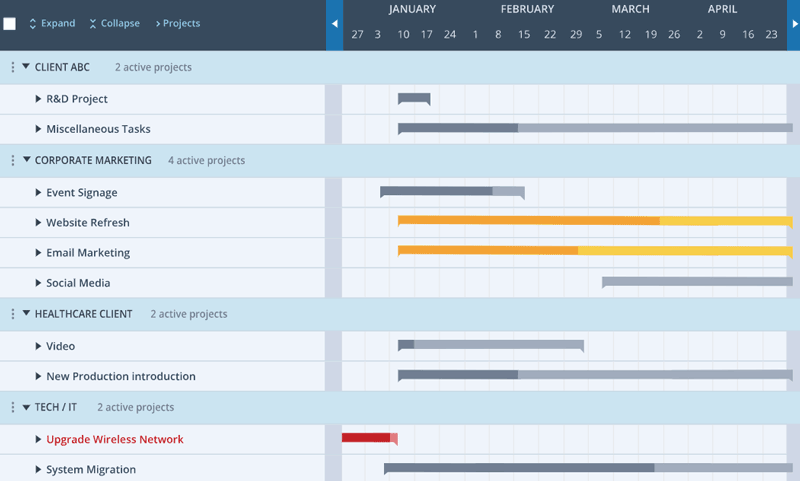
These charts make it convenient for the managers to track task progress with simplified data representation. The managers can change the schedule of project operations easily according to the priority status and links among different tasks. The deadlines, initiation data, estimated duration, alteration, and other adjustments can all be managed through these charts.
Analytical reporting Workzone tools get high appreciation from the managers. These tools update users with real-time reports, progress metrics, resource data, task completion rates, and any overdue duties. Through these tools, quick and informed improvement strategies can be implemented in the project operations.
These automated alerts are helpful to inform team members about their duties and any updates to the task assignment. These updates are sent via email to notify of any changes in task schedules, priority task allocation, important notifications, meeting schedules, and approaching deadlines. These alerts keep the team up-to-date and aware of their daily responsibilities.
See The Software In Action Watch Free Demo!
Top Recommended Software






Workzone Software Reviews
Frequently Asked Questions (FAQs)
A: Certainly, this PMO does have a free plan available known as Workzone project management.
A: Yes, the Work zone management solution is web-based and cloud-based.
A: English is the language that the Work zone supports.
A: Workzone project management allows buyers to get answers through help desk, phone support, chat assistance, Workzone reviews, FAQs, knowledge base, and email. You can also get details about the Workzone pricing.
A: There is a Work Zone app that provides remote convenience for project operation monitoring. Users can have access to the functionalities of this software platform through a single Workzone login.
A: Yes, the Workzone API is available.
A: Certainly, iOS and Android handheld devices are supported by this project management software, with a requirement for an RWS Workzone login to access the dashboard, according to blauzone reviews.
A: Yes, there is a complimentary SAP Workzone free trial option, and you can also request a free Workzone demo.
A: Indeed, the apps that Workzone tools integrate with are QuickBooks Online, Google Drive, Harvest, Slack, Dropbox, Salesforce, etc.
A: Workzone alternatives could be ClickUp, Wrike, Asana, Smartsheet, Trello, etc.
