Overview

PracticeQ provides a modern, paperless ecosystem that turns clinical chaos into a streamlined professional experience. You can automate patient intake, scheduling, and billing, allowing your team to focus on healing rather than other tasks in aspects of the practice. It functions as a complete digital command center, bridging the gap between your front office and the treatment room. It supports automated reminders, digital forms, e-prescribing, and secure messaging that reduce manual administrative work and improve patient follow-through. Some users may need time to explore its full customization and advanced setup options; regardless of this learning curve, it still delivers strong value with flexible features and efficiency gains that make it a worthwhile investment for growing practices.

PracticeQ Software Specifications

Patient Portal
Mobile App
User Login
Activity Calendar

What is PracticeQ?

Practice Q is a cloud-based EHR and practice management system that brings scheduling, charting, billing, intake forms, virtual consultation, and payments into a centralized and connected space, helping clinics run daily tasks without extra tools. It focuses on automation, patient engagement, and customizable workflows so teams can save time and stay organized while improving care delivery and communication.

PracticeQ Integrations

Third-party apps and tools integrations are supported by this EMR software solution, which includes:

EHR Integrations:

Insurance Clearinghouses:

Out-of-Network Reimbursement:

  • Reimbursify

Telehealth:

Faxing:

  • SRFax

Supplement Recommendations:

  • Fullscript

Labs:

  • Rupa Health

Google Tools:

  • Google Analytics
  • Google Calendar
  • Google Drive

Calendar:

  • Outlook Calendar

Workflow Automation:

What is Practice Q EHR Best For?

PracticeQ EHR works best for independent and growing healthcare clinics that want to reduce manual work without juggling multiple tools. Its payment processing comes at rates lower than Square or Stripe, and its e-Prescribing runs on the ScriptSure network, a 2022 White Coat Award winner for prescription accuracy. From recurring appointment packages to ACH, close to no IT stress, and credit card support, it fits practices that need financial flexibility with clinical depth in a unified place.

How To Use PracticeQ EMR?

Access the secure PracticeQ login page to open your main practice dashboard, then follow the given steps:

  • Create custom intake forms using the drag and drop builder or choose a template.
  • Send digital forms to patients via a secure link for them to complete at home.
  • Use the online booking feature to let patients schedule their own appointments 24/7.
  • Sync your existing calendar to keep your daily appointments organized in one place.
  • Review completed patient forms that automatically populate into the digital chart.
  • Enable automated text or email reminders to keep your schedule full and reduce no-shows.
  • Collect payments or insurance information securely through the integrated billing portal.
  • Use the HIPAA-compliant messenger to chat with patients or team members safely.
  • Generate practice reports to track your growth and clinical performance over time.

Book a free PracticeQ demo to know more about the usage, functionalities, modules, and its integration capabilities.

Who is PracticeQ EHR For?

This is the best software for intake automation in small counseling practices, but the medical personnel who can leverage this system to the fullest are:

Specialties and Practice Types:

  • Psychiatrists
  • Behavioral health therapists
  • Chiropractors
  • Nurse practitioners
  • Physical and occupational therapists
  • Med spa and aesthetic clinic owners
  • IV infusion clinic operators
  • Direct primary care (DPC) providers

Use Cases:

  • Solo providers
  • Multi-location clinics
  • Growing teams and group practices

How Much Does PracticeQ Cost?

PracticeQ pricing plans encompass a 14-day free trial with no credit card required and no contracts to sign. Two plans are available:

  • Starter: $59.90/month
  • Pro: $84.90/month

Every plan includes HIPAA compliance with BAA, integrated payments, appointment reminders, telehealth, secure patient portal, customizable forms, task management, team messaging, dedicated phone and email support, and more. Get a tailored Practice Q pricing quote that suits your practice needs and budget.

Note: The pricing can change over time. 

Why Choose Practice Q EHR?

Practice Q EMR is an all-in-one cloud-based EHR and practice management tool built to take the weight of admin off your shoulders. It covers everything from patient intake and appointment scheduling to insurance billing and clinical charting. Whether you run a solo practice or manage multiple clinic locations, it keeps everything under one roof. HIPAA, PIPEDA, and GDPR compliant, this is where patient care and smooth operations finally meet.

Security is woven into the fabric of the platform, ensuring your practice remains fully HIPAA compliant through robust encryption and secure data storage. You benefit from a system that scales effortlessly as your clinic expands from a solo venture to a multi-provider facility. It offers enterprise-grade reliability and rigorous safety protocols, providing the peace of mind that your sensitive medical records and financial data are handled with the highest level of care.

Connect with our client assistance for more details with respect to your software expectations and budget. You can also book a Practice Q demo and read unbiased PracticeQ reviews for more clarity.

PracticeQ Features

PracticeQ login gives prescribers a fully integrated electronic prescription system right within the patient management dashboard. It pulls in each patient’s medication history and insurance formulary data so providers can make well-informed decisions. The e-Prescribing module is backed by the ScriptSure network, which earned the 2022 White Coat Award for accuracy in prescription transactions.

This system integrates with Heidi, an AI medical scribe that listens to patient sessions and turns them into complete, formatted notes directly inside your PracticeQ templates. Clinicians reportedly save over two hours of documentation time daily, and the average productivity gain translates to roughly $65,000 recovered per year. Notes are ready the moment a session ends, no copy-pasting or switching between tabs needed.

Practice Q login gives every patient a dedicated online portal where they can complete intake forms, review documents, make payments, and communicate securely with their provider. Everything is HIPAA-compliant and accessible from any device. This reduces front desk back-and-forth and gets patients set up long before they walk through the door.

This system offers a fully customizable online booking system with automated reminders, recurring appointment packages, and calendar syncing across Google and Outlook. Patients can book at any time and receive automatic follow-ups, while providers get a clean, centralized schedule to manage in real time across single or multiple locations.

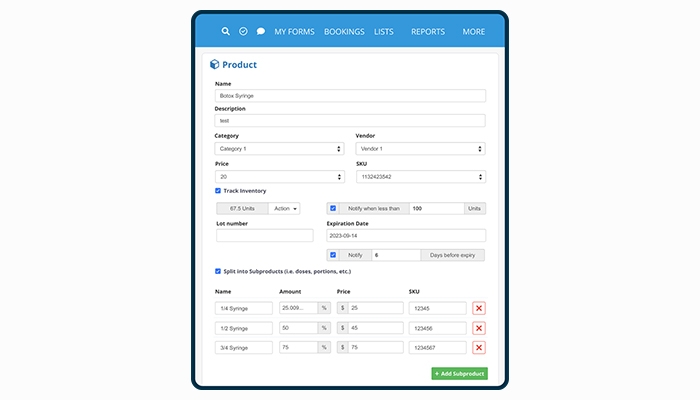
A built-in inventory management module helps clinics keep tabs on products and supplies without spreadsheets or separate tools. Stock levels are tracked digitally, and the system can be set up to match how your specific practice operates, whether that is a med spa managing skincare products or an IV clinic tracking consumables.

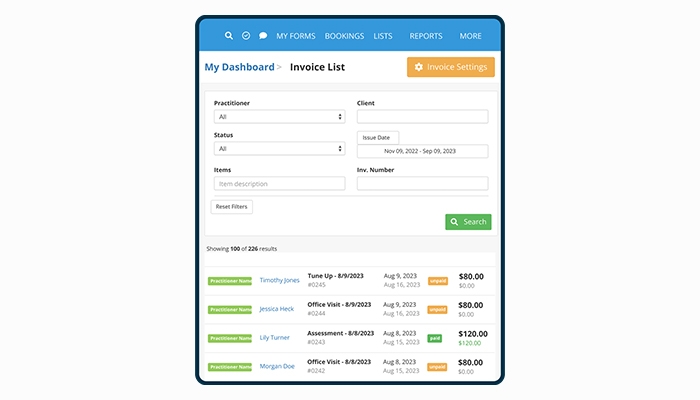
PracticeQ Payments processes both credit card and ACH transactions directly within the platform at rates that beat Square and Stripe. Invoicing, recurring billing, insurance superbills, and claims are all handled in one place. There are no third-party payment tools to log into, and the application process to get started is straightforward with no long setup delays.

See The Software In Action Watch Free Demo!

    PracticeQ Reviews

    Overall Rating

    4

    2 Review(s)

    Rating Distribution

    5

    (0)

    4

    (2)

    3

    (0)

    2

    (0)

    1

    (0)

    Share your experience
    John S.

    Consulting

    Ease of use
    8
    Value for money
    8
    Customer Support
    7
    Functionality
    8

    My software review

    Pros

    The platform has been a dependable part of our daily operations. It handles core tasks smoothly and keeps everything organized without adding complexity.

    Cons

    Limited advanced customization options.

    Damian K.

    Technology

    Ease of use
    8
    Value for money
    9
    Customer Support
    7
    Functionality
    8

    An excellent System

    Pros

    The software offers a good mix of features that support our workflow and improve efficiency. It covers most of our needs, though there are occasional areas where improvements could enhance usability. Still, it delivers solid value for the price.

    Cons

    Occasional lag in updates or syncing.

    Frequently Asked Questions

    No, Practice Q does not offer a free plan. However, it does provide a 14-day free trial with no credit card required, and you can also request a free demo before committing.

    Yes, PracticeQ EMR is fully cloud-based, which means you can access and manage your practice from anywhere using a browser or the mobile app.

    Practice Q EHR currently supports English.

    PracticeQ software users can reach the support team by phone and email. The platform also includes a knowledge center, onboarding experiences (both live and on-demand), and a community group. You can get full pricing details directly on the PracticeQ com website.

    Yes, PracticeQ has a mobile app that lets you manage your practice remotely. All features are accessible through a single PracticeQ login across devices.

    Yes, PracticeQ offers an open API that developers can use to build custom integrations for forms, client data, appointments, files, invoices, claims, and more.

    Yes, the PracticeQ system works on both iOS and Android devices. You just need a Practice Q login to access your dashboard on the go.

    Yes, this platform offers a 14-day free trial with no credit card needed. You can also book a free Practice Q demo to see the platform in action before signing up.

    Indeed, it connects with a range of third-party tools, including Zoom, Google Meet, Google Drive, Google Calendar, Outlook Calendar, Fullscript, Rupa Health, Trizetto, Office Ally, SRFax, Reimbursify, Zapier, Elation, AthenaHealth, and RevolutionEHR.