Overview
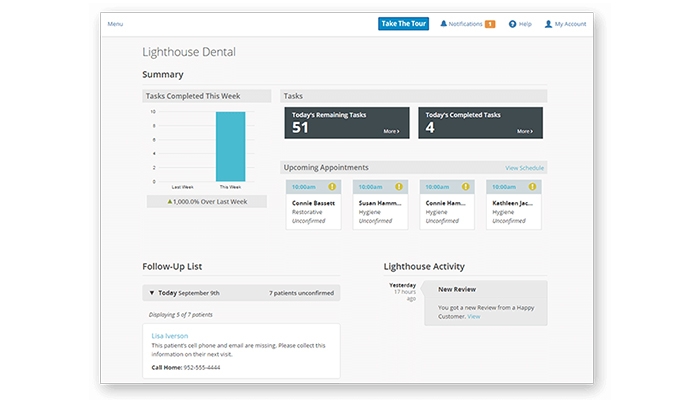
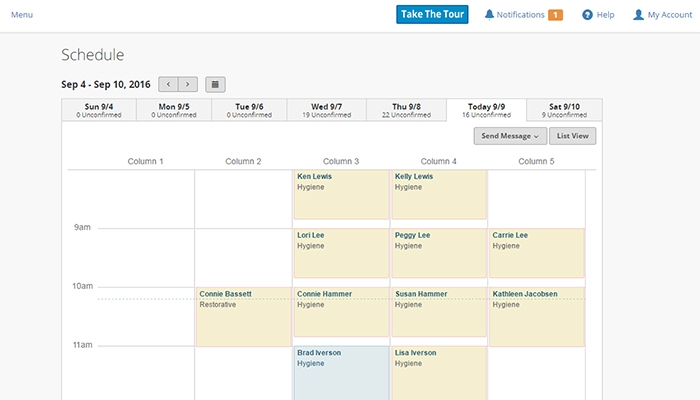
Lighthouse 360 is a dental practice management and patient communication tool built specifically for dental offices across the United States. It takes the most repetitive, time-consuming front desk work off your team's plate by automating appointment confirmations, recall reminders, patient messaging, and schedule management, all from a unified dashboard. Over 11,000 dental practices rely on it to stay organized, keep chairs filled, and deliver a smoother patient experience. Trusted enough to win multiple Townie Choice Awards and earn recognition as a Dental Product Shopper "Best Product," it speaks for itself in the dental community. One thing some users have flagged is that reaching live customer support can occasionally take longer than expected. Still, regardless of this drawback, the time saved through automation and the reduction in no-shows make it a solid investment for practices looking to run leaner and serve patients better.
Lighthouse 360 Software Specifications
What Is Lighthouse 360?
Lighthouse360 is a patient communication and engagement software designed for dental practices. This system helps clinics automate reminders, manage patient outreach, and maintain steady appointment flow. It simplifies daily operations by reducing manual tasks and scheduling overhead. It also supports online reputation growth by helping practices collect and share patient reviews, allowing teams to focus more on delivering quality care while keeping patients linked and engaged.
What Is Lighthouse Dental Software Best For?
Lighthouse 360 brings coordination, scheduling support, and participation tools into a centralized system. This system helps practices reach patients through automated messages, improve attendance, and maintain consistent follow-up. It supports stronger patient relationships by keeping interactions timely and organized. It allows teams to manage outreach efforts with ease while improving efficiency, visibility, and overall practice performance through reliable and structured communication workflows.
How To Use Light House 360 Software?
Add your unique credentials for a Lighthouse 360 login, then navigate to the dashboard for exploration. After that, follow these instructions to utilize this system to the fullest:
- Connect the practice management system
- Import patient data and schedules
- Set up automated reminders and recalls
- Customize messaging preferences for patients
- Enable review requests after appointments
- Activate two-way messaging for communication
- Monitor appointment confirmations in real time
- Track performance through reporting tools
- Adjust campaigns to improve patient engagement
Book a free Lighthouse 360 demo for details and comprehension regarding its usage.
Lighthouse 360 Integration
Light House 360 connects with the following practice management systems:
- ABELDent
- DentalVision
- Dentisoft
- Dentrix Core
- Eaglesoft
- EasyDental
- Open Dental
- OrthoTrac
- PerioVision
- XLDent
How Much Does Lighthouse 360 Cost?
Lighthouse 360 pricing details are available only upon request.The official website does not publicly list set plan tiers or fixed monthly rates. To get a number that fits your practice size and needs, you would need to contact the team directly for a custom quote.
Who Is LH 360 For?
LH360 Dental acts as a digital bridge between dental professionals and their patients, automating the tedious parts of office management. The following are the sectors and medical personnel who can leverage this system to the fullest:
- General Dentistry Practices
- Orthodontic Clinics
- Pediatric Dental Offices
- Oral Surgery Centers
- Periodontal Specialists
- Endodontic Practitioners
- Dental Office Managers
- Front Desk Coordinators
- Dental Hygienists
Why Choose Lighthouse 360 Dental Software?
Lighthouse360 provides a dedicated dental practice management suite designed to automate the repetitive tasks that keep your front desk busy. Your clinic can virtually eliminate “no-shows” through a smart, automated recall system that reaches patients exactly how they prefer. It functions as a digital assistant that works around the clock to fill your schedule, allowing your team to focus on providing excellent patient care rather than chasing down appointments on the phone.
The platform is built with a deep commitment to data protection, maintaining full HIPAA compliance to keep patient records private and secure. Your practice benefits from enterprise-level security that protects sensitive health information while remaining completely scalable as your patient list grows. It provides a reliable, secure connection between your existing practice management software and the cloud, ensuring your office meets all modern dental regulatory standards without any extra technical stress.
Feel free to connect with our software support team to have more details regarding the suitability of this platform for your business operations before making any financial commitments. You can watch a free demo and read the unbiased Lighthouse 360 reviews for a third-party perspective.

Lighthouse 360 Features
AutoConfirm takes the back-and-forth out of appointment confirmations. Whether a patient replies through email, text, or an automated phone call, a Lighthouse 360 customer login pushes that confirmation straight to your practice management system. Nobody on the front desk has to touch it. It is one of those features you quickly wonder how you lived without, especially during high-volume days when manual updates would otherwise eat up hours.
Two-way texting lets your team hold actual back-and-forth conversations with patients through the dashboard, no phone required. It is not just automated blasts. Staff can personally reach out, answer questions, confirm details, and sort out scheduling changes all through text, right from the same screen they use for everything else through a Lighthouse 360 log in. Patients get the fast, casual communication they prefer, and your team gets to stay at their desk.
The front desk tasks feature builds a personalized daily checklist for your staff, automatically tied to individual patients through a Lighthouse 360 provider login. If someone is missing an email address, has a birthday coming up, or still has an outstanding form on file, it shows up in the task list. Everything is pulled together in one place, so your team walks in prepared and can move through the day without scrambling to remember what needs attention.
Automated reminders in Lighthouse 360 dental software go out to patients well before their appointments, through whichever channel they prefer, whether that is text, email, or phone. For patients who are due for cleaning or have outstanding treatment, it sends recall messages automatically. No one slips through the cracks.
Online booking with a Lighthouse 360 dental login opens up your schedule around the clock. Patients can request appointments at any hour without calling the office, and you stay in control of what slots and providers they can actually see. It brings in new patients and keeps existing ones engaged by removing the friction of having to call during business hours, a small change that makes a real difference in how full your calendar stays.
Patient messaging in Lighthouse 360 support gives your practice a fast way to reach everyone at once when something unexpected comes up. If the office closes suddenly or a provider calls out, you can send a message to all affected patients in just a few clicks. It also stores the full history of every text and email sent, so your team always has context and nothing important gets lost between shifts.
See The Software In Action Watch Free Demo!
Top Recommended Software
Lighthouse 360 Pros and Cons
Lighthouse 360 Software Reviews
Frequently Asked Questions
No, Lighthouse360 does not offer a free plan. It is a paid software solution designed for dental practices, with Lighthouse 360 pricing available upon contacting the team directly.
Yes, Lighthouse360 is cloud-based, which means your team can access it without being tied to a single device or location.
English is the language Lighthouse 360 Dental currently supports.
LH360 Dental gives users access to phone support and email assistance. For pricing details, contacting the team directly is the best route.
Lighthouse 360 support encompasses mobile devices and is accessible on both iOS and Android. Users can log into the platform and stay connected to their practice on the go through a single Lighthouse 360 login.
No, Lighthouse 360 does not currently offer a public API.
A free demo is available upon request through lh360.com, giving you a chance to see the product in action before making any commitment.