Overview

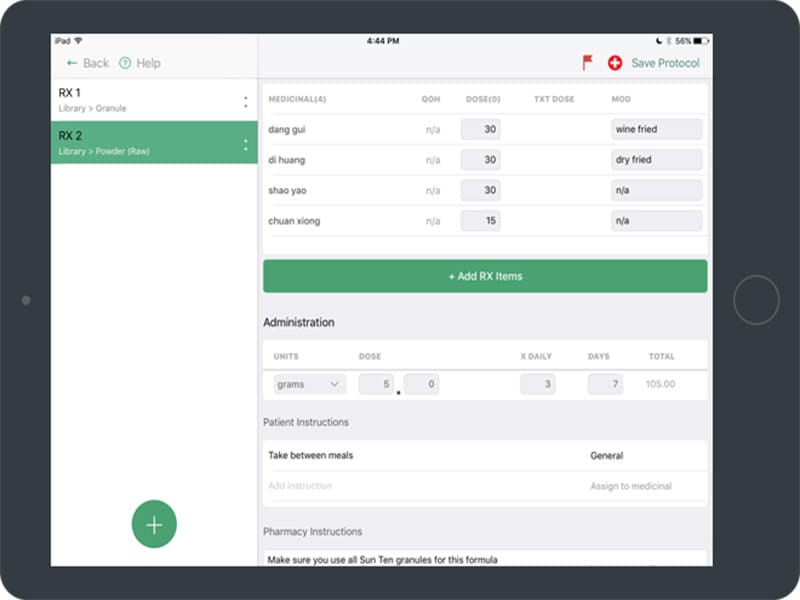
Unified Practice is a cloud-based digital ecosystem designed specifically for acupuncture and wellness clinics. It combines clinical charting with business tools, helping you move away from paper files and fragmented systems into one smooth workflow. This system might be a bit difficult to use at first with advanced features, but it streamlines appointment scheduling and resource management like a professional, saving time and effort.

Unified Practice Specifications

Patient Portal
Mobile Access
User Login
Activity Calendar

What Is Unified Practice?

UnifiedPractice is an acupuncture practice management platform designed to unify scheduling, communication, charting, prescriptions, invoicing, and clinic management in one system. Built specifically for acupuncture clinics, it helps practitioners reduce administrative workload while improving the patient experience. By replacing paperwork and disconnected tools with a streamlined digital workflow, this system allows providers to focus more on patient care while maintaining clear visibility into the daily performance of their practice.

Unified Practice Integrations

Third-party apps and tools integrations are supported by this EHR software solution, which includes:

What Is Unified Practice EHR Best For?


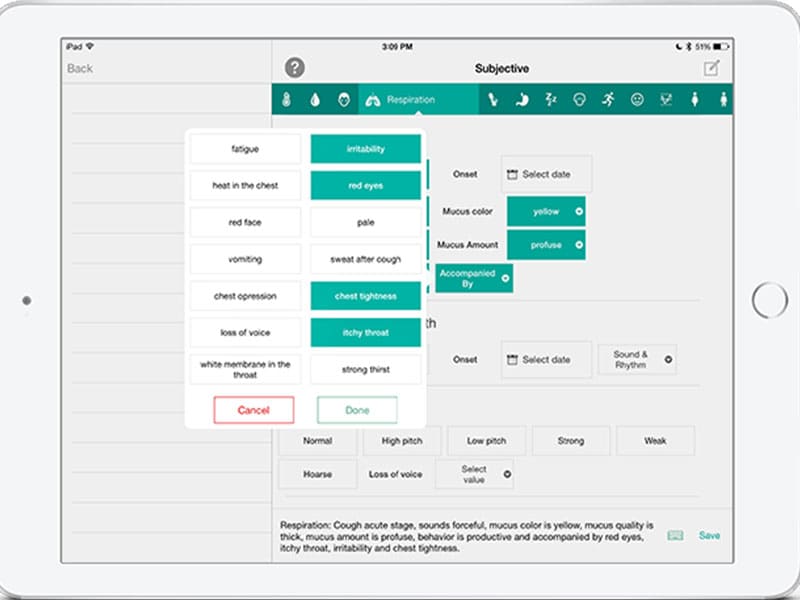
Unified Practice is ideal for acupuncture clinics that want a system designed around the way acupuncturists document and manage treatments. Its dedicated iPad charting module allows practitioners to record patient visits naturally during consultations.

Who Can Use Unified Practice EMR?

This software can be leveraged by all scales of operations of the following medical sectors:

  • Yoga
  • Acupuncture
  • Massage
  • Herbal Medicine
  • Nutrition and lifestyle counseling

How To Use United Practice?

Add your credentials for a unique United Practice login, navigate to the dashboard, and follow the further mentioned steps:

  • Register your clinic and set up your business information, locations, and treatment rooms.
  • Add your staff members and define their roles to manage who can see specific patient data.
  • List your services and set your fee schedule so the platform can handle automatic invoicing.
  • Link your calendar to enable online booking, allowing patients to schedule their own sessions.
  • Create custom medical questionnaires and consent forms that are sent automatically to new patients.
  • Open the digital chart during a session to use pre-built templates for acupuncture and herbal notes.
  • Record treatments quickly by duplicating previous SOAP notes or using the point-and-click body map.
  • Process payments or file insurance claims directly from the completed appointment record.
  • Check the inventory tracker to ensure your herbs and supplies stay in stock as you sell them.
  • Run real-time financial reports to see which services are driving your practice’s growth.

You can schedule a free Unified Practice demo for a deeper dive into its robust functionalities and usage.

How Much Does Unified Practice Cost?

The three Unified Practice Pricing plans are mentioned below:

  • Premium: $152/month
  • Enhanced: $114/month
  • Starter: $74/month

You can receive a personalized Unified Practice price quote that suits your practice requirements and budget.

Note: The pricing can change over time. 

Why Choose Unified Practice EHR?

Best practices for building a unified customer data platform opt for this system. UnifiedPractice is built to grow alongside your clinic while maintaining the highest level of data protection, along with a comprehensive suite of features that every healthcare practice needs. The software is fully HIPAA-compliant, ensuring that all patient health information is encrypted and stored securely on the cloud.

It features end-to-end encryption and role-based access controls, meaning you decide exactly what each team member can access. Whether you are a solo practitioner or a multi-location enterprise, the platform scales effortlessly without losing performance. The system is ONC-certified, meeting federal standards for health information technology, which helps you stay aligned with modern medical regulations.

Connect with our software support team for any queries and read the unbiased Unified reviews for better decision-making.


Unified Practice Features

A Unified Practice login makes appointment scheduling simple and organized for busy clinics. Practitioners can schedule visits by service, room, or provider while managing multiple practitioners and locations from a single calendar. Patients can also book appointments directly through online booking tools and receive automated reminders, helping reduce missed visits and keep the clinic’s schedule running smoothly.

The charting system is designed to simplify clinical documentation while supporting detailed patient care. Practitioners can quickly record treatment notes, track patient progress, and use customizable templates that fit different treatment approaches. The platform also includes a comprehensive clinical database that helps practitioners efficiently document diagnoses and treatment plans.

UnifiedPractice streamlines billing by bringing invoicing, insurance claims, and patient billing into one connected system. Clinics can generate invoices, manage claims, and monitor billing activities without switching between multiple tools. This integrated workflow reduces administrative effort and helps clinics handle their revenue cycle more efficiently.

The platform includes built-in payment management that makes collecting and tracking payments straightforward. Clinics can accept credit cards, manage memberships, and process various payment types within the system. It also supports financial tracking, allowing practitioners to keep a clear record of transactions and patient payments.

These features provide real-time reporting that helps clinics understand how their practice is performing. Practitioners can review insights such as appointment trends, patient demographics, treatment outcomes, and financial performance. 

The platform supports direct communication between clinics and patients. Practitioners can send appointment reminders, securely share information, and stay connected with patients through messaging tools. This helps clinics maintain consistent communication while ensuring patients stay informed about their care and appointments.

United Practice includes a secure patient portal that gives patients convenient access to their health information. Patients can schedule appointments, review records, and communicate with their providers in one place. The portal encourages patient engagement while helping clinics provide a more connected care experience.

See The Software In Action Watch Free Demo!

    Unified Practice Reviews

    Overall Rating

    4.8

    5 Review(s)

    Rating Distribution

    5

    (4)

    4

    (1)

    3

    (0)

    2

    (0)

    1

    (0)

    Share your experience
    Kelly

    Hospital & health care

    Ease of use
    10
    Value for money
    10
    Customer Support
    10
    Functionality
    10

    Great tool

    Pros

    It’s super easy to learn and use, which has made the transition to electronic paperwork a breeze. It’s been a huge help with managing tasks.

    Cons

    Sometimes, features are updated without any notice, and then I have to figure out how to adjust things on my end to make it work for us.

    David

    Health, wellness and fitness

    Ease of use
    9
    Value for money
    10
    Customer Support
    10
    Functionality
    9

    Amazing for acupuncture

    Pros

    I like that it’s designed specifically for acupuncturists, and it’s fairly easy to learn without much effort.

    Cons

    Sometimes the fields feel a bit rigid, which makes me type more than I’d like to properly explain my notes.

    Nancy

    Health, wellness and fitness

    Ease of use
    10
    Value for money
    10
    Customer Support
    10
    Functionality
    10

    I just love Unified Practice

    Pros

    This EHR is very easy for me to use. It covers everything from patient scheduling to herbal inventory management, which I really appreciate. I love it overall, and the support team has been amazing to work with.

    Cons

    I’m quite satisfied with the software overall. If I had to point out something, the loading spinner could be a bit faster when browsing, but it’s a very minor issue.

    Frequently Asked Questions

    A: Certainly not, the United Practice software does not have a free plan available.

    A: Yes, Unified Practice is cloud-based. 

    A: English is the language that the United Practice supports.

    A: Unified Practice allows buyers to get answers through phone support, FAQs, chat assistance, help desk, forums, and email. You can also get details about the Unified Practice pricing.

    A: There is a Unified Practice mobile app that provides remote convenience for appointment scheduling. Users can access the functionalities of this software platform through a single Unified Practice login. 

    A: Certainly, iOS handheld devices such as iPhone and iPad are supported by this practice management software, with a requirement for a Unified Practice login to access the dashboard, according to Unified Practice reviews.

    A: Yes, there is a Unified Practice free trial option, and you can also request a free demo.

    A: Indeed, the apps this tool integrates with are Constant Contact, Acupbilling, Lifesize, and Handcraft Health.