Overview

Practice Better is an all-in-one EHR and practice management platform built specifically for health and wellness professionals. Trusted by more than 50,000 practitioners, it pulls together scheduling, telehealth, charting, billing, secure messaging, client portals, and online programs into a unified workspace, so running a practice does not require multiple tools. Whether you are working solo or with a full team, it scales to fit how you operate. One limitation worth knowing is that several useful features like SMS reminders, ePrescribe, and faxing are add-ons that come with extra costs beyond the base plan price. Even so, the overall value, the depth of tools available, and the quality of the client experience it enables make Practice Better sign in as a genuinely worthwhile endeavor for any wellness professional looking to grow.

Practice Better Software Specifications

Patient Portal
Mobile App
User Login
Activity Calendar

What Is Practice Better?

PracticeBetter is an all-in-one practice management software designed to help health and wellness professionals manage clients, schedules, billing, and communication. A simple Better Practice portal simplifies daily operations while supporting better client care through organized records and easy workflows. It allows practitioners to run their business smoothly, stay connected with clients, and handle tasks effectively, making it a reliable solution for growing and managing a modern wellness practice.

How Much Does Practice Better Cost?

Practice Better pricing involves a free plan and four paid tiers. All paid Practice Better pricing plans come with a free trial (14 days for most, 30 days for the Team plan).

Practice Better plans include:

  • Sprout: Free (up to 3 clients; for students and new practitioners)
  • Starter: $25/month (billed annually) or $35/month (billed monthly)
  • Professional: $69/month
  • Plus: $99/month
  • Team: $155/month

Add-ons available from the Professional plan and up:

  • ePrescribe: $49/month (one-time onboarding fee of $99 per prescribing practitioner)
  • PDMP (Prescription Drug Monitoring Program): $5/month (one-time onboarding fee of $399)
  • SMS Reminders: $0.05 per text (credits required on Professional plan; 750/month included on Plus; 2,000/month on Team)
  • Additional Admin User: $10/month
  • Fax (Send and Receive): $0.10 per page
  • Additional Practitioner (Team plan only): $50/month
  • Additional Storage: $1/GB per month
  • AI Charting Assistant: First 600 minutes free; $0.60/hour after

Practice Better Integrations

Third-party apps and tools integrations are supported by this EMR software solution, which includes:

  • That Clean Life
  • Fullscript
  • WholeScripts
  • Rupa Health
  • Dropbox
  • Google Analytics
  • Google Calendar
  • Zoom
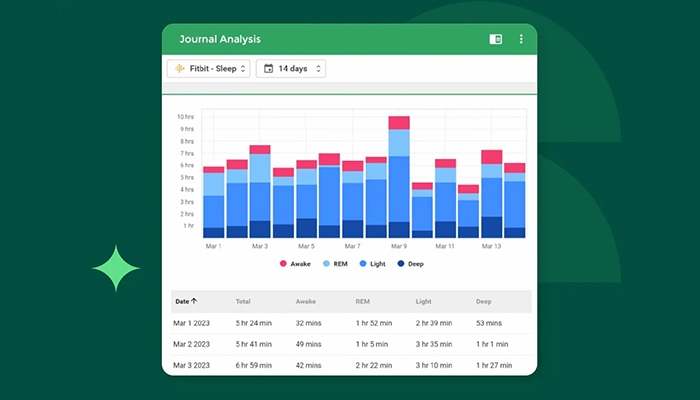
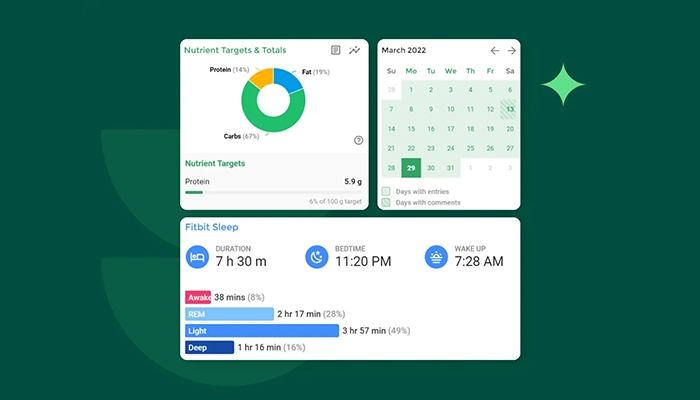
  • Fitbit
  • Apple Health
  • Claim.MD
  • Stripe 
  • Zapier

What Is Better Practice Best For?

BetterPractice is best for professionals who want to deliver personalized care while keeping everything connected. With Practice Better log in, it supports nutrition planning through its integration with That Clean Life, helping create custom meal plans, track client habits, and manage food journals with ease. It also helps guide clients with useful insights, making it easier to build stronger engagement and provide a more tailored care experience.

Who Can Use Practice Better EHR Software?

Add your credentials for a unique Practice Better login to create your professional account and set up your personalized practitioner Practice Better client portal.

  • Link your bank account to the secure payment system to handle invoices effortlessly.
  • Build custom digital intake forms that clients can sign and return from any device.
  • Open your calendar to set your availability and let clients book their own sessions online.
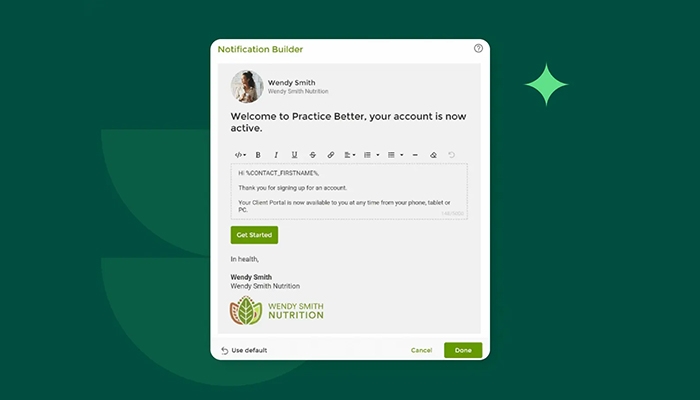
  • Use the automated invite feature to welcome new clients into their private portal.
  • Launch high-quality telehealth video calls directly within the platform for virtual consultations.
  • Create personalized protocols and nutrition plans that clients can access instantly on their phones.
  • Enable the mobile food and lifestyle journal to track client progress between appointments.
  • Send secure, real-time messages to answer questions and keep clients motivated.
  • Launch a group program or online course to share your expertise with multiple people at once.

Schedule a free Practice Better demo for more details. You can also evaluate the EHR systems company Practice Better on DPC and visit Practice better.com to know in-depth about the platform.

Who Is Practice Better Health For?

My Practice Better can be leveraged  by:

  • Health coaches
  • Dietitians and registered dietitians
  • Nutritionists and clinical nutritionists
  • Mental health professionals and licensed counselors
  • Functional medicine practitioners
  • Naturopathic doctors and naturopaths
  • Medical doctors and psychiatrists
  • Nurse practitioners
  • Chiropractors
  • Personal trainers
  • Solo practitioners
  • Group practices and multi-practitioner clinics
  • New and student practitioners (via free Sprout plan)
  • Wellness businesses looking to sell online courses and programs

Practice Better EHR Vs Practice Management Software Healthie

When choosing between Healthie vs Practice Better, practitioners are essentially evaluating two robust platforms that function as both an EHR and practice management software. While they share core competencies like telehealth, billing, and scheduling, their design philosophies often dictate the final choice. Healthie is frequently favored for its nutrition-centric analytics, multi-provider scheduling depth, and enterprise-grade infrastructure. In contrast, Practice Better often edges ahead in program delivery, flexible billing options, and highly customizable charting templates.

For those looking at Healthie competitors, the market is broad; however, Practice Better remains a primary alternative due to its deep engagement features and automation capabilities. If you require specialized email marketing support, you can easily achieve a Practice Better Mailchimp integration by using an automation platform like Zapier, which links the two systems to sync client data and streamline your marketing workflows without manual entry.

Is Practice Better EMR The Right Choice?

Practice Better serves as a vibrant digital home for health and wellness professionals, bringing your entire practice into one intuitive, cloud-based space. You can automate intake, scheduling, and charting, while offering clients a mobile portal for food journaling and programs. It functions as a central hub that replaces scattered apps, helping you build deeper connections and scale your services. This platform empowers you to focus on healing while it handles the heavy lifting of business administration.

Trust and privacy are built into every feature, as the system maintains strict HIPAA, GDPR, and PIPEDA compliance. You benefit from enterprise-grade security and data encryption that protects sensitive health information across all devices. Its flexible architecture is designed for scalability, effortlessly supporting your growth from a solo start-up to a large multi-provider clinic, ensuring your practice remains professional, secure, and ready for future expansion.

Connect with our software experts to know more about the system usage, integration capabilities, functionalities and suitability with your practice needs. You can watch a free Practice help demo and read the unbiased Practice Better demo.


Practice Better Features

Practice Better login makes booking completely hands-off for practitioners. Clients can book, reschedule, and confirm appointments on their own through a public booking page or widget that reflects real-time availability. Session reminders are customizable, packages can be bundled and sold together, and the platform supports unlimited office locations for practices operating across multiple physical sites.

PracticeBetter has its own built-in HIPAA-compliant video platform, so practitioners do not need a separate Zoom account for one-on-one visits. Virtual sessions launch directly from the client record, and the same telehealth setup works for individual and group sessions alike. It is clean, straightforward, and does not require any downloads from the client side.

Charting in Better Practice is designed to be quick rather than painful. Practitioners can build note templates tailored to their own workflow, use the AI Charting Assistant to dictate and summarize session notes, and attach frequently used materials directly to session types. Notes auto-save as you work, so nothing gets lost mid-session. The template library also includes ready-made options for faster setup.

Better Practice login covers the full billing cycle from invoicing to superbills for insurance reimbursement. It integrates with Claim.MD for a more complete claims management workflow. Practitioners can set up recurring billing, account deposits, and payment plans, and the built-in reporting breaks down revenue by income stream so you always know where your money is coming from.

BetterPractice supports electronic prescribing directly from within the platform, including controlled substances through EPCS. Practitioners can send prescriptions in seconds without switching tools. The optional PDMP add-on lets prescribers monitor controlled substance histories for their patients, adding an extra layer of oversight when needed.

Practice Better Payments is the platform’s built-in processing solution, powered by Stripe. It handles one-time payments, recurring charges, deposits, and payment plans. Practitioners can track all transactions without needing a separate accounting tool, and the system ties directly into reporting, so revenue data stays organized and accessible.

Practice Better IT login lets practitioners build and sell programs in three formats: fixed-date, self-paced, and evergreen. These can include video content, forms, resources, and protocols. It is a practical way to grow income beyond one-on-one sessions, and done-for-you program templates are included on the Plus and Team plans to get things moving faster.

Running group sessions in Practice Better client login works the same way as individual bookings. Practitioners can schedule and host virtual group classes through the telehealth feature, set capacity limits, and manage registrations through the same system. Group messaging is also available for communicating with all participants at once, keeping coordination simple. 

Every client gets access to a dedicated portal where they can view their care plans, complete forms, track progress, message their practitioner, and log journals through their Practice Better patient login. The Practice Better app extends this access from any phone, keeping clients connected and accountable between sessions. Practitioners also use the Better Practice app to stay on top of their schedule and messages on the go.

Practice Better EHR gives practitioners full visibility into their financial picture through its reporting tools. Income can be tracked by service type, client, or program, and superbills can be generated and shared with clients for insurance reimbursement. For group practices, the Team plan adds managed billing and team reporting so every practitioner’s numbers stay organized in one place.

See The Software In Action Watch Free Demo!

    Practice Better Reviews

    Overall Rating

    4

    2 Review(s)

    Rating Distribution

    5

    (0)

    4

    (2)

    3

    (0)

    2

    (0)

    1

    (0)

    Share your experience
    John S.

    Consulting

    Ease of use
    8
    Value for money
    8
    Customer Support
    7
    Functionality
    8

    My software review

    Pros

    The platform has been a dependable part of our daily operations. It handles core tasks smoothly and keeps everything organized without adding complexity.

    Cons

    Limited advanced customization options.

    Damian K.

    Technology

    Ease of use
    8
    Value for money
    9
    Customer Support
    7
    Functionality
    8

    An excellent System

    Pros

    The software offers a good mix of features that support our workflow and improve efficiency. It covers most of our needs, though there are occasional areas where improvements could enhance usability. Still, it delivers solid value for the price.

    Cons

    Occasional lag in updates or syncing.

    Frequently Asked Questions

    Not entirely, but Better Practice does offer a free Sprout plan for students and new practitioners working with up to 3 clients. Paid plans start at $25 per month.

    Yes, PracticeBetter is cloud-based and accessible from any browser or through its mobile app.

    English is the primary language that Practice Better io supports.

    Practise Better offers support through its Help Center, online resources, a community forum, and a dedicated support team. You can also find details about Practice Better pricing plans directly on the official practicebetter.io website.

    Yes, there is a Better Practice mobile app for both practitioners and clients. It gives remote access to schedules, messages, journals, care resources, and more. Users access everything through a single Practice Better login.

    Yes, Practice Better software supports integrations via Zapier (available on Professional plan and up), which allows connecting it to a wide range of third-party apps and workflows.

    Yes, Practice Better EHR supports iOS and Android devices through its dedicated mobile app, with a Better Practice login required to access the dashboard.

    Yes, PracticeBetter offers a 14-day free trial on any paid plan, and a 30-day free trial on the Team plan. A free Sprout plan is also permanently available for those just getting started.

    Yes, the tool integrates with a wide range of apps, including Google Calendar, Google Drive, Zoom, Fullscript, That Clean Life, Rupa Health, Fitbit, Apple Health, Oura, Cronometer, Zapier, and Claim.MD, and more.