

Overview
PCC (Physician's Computer Company) is a pediatric EHR built entirely around independent pediatric practices. It covers everything from financial management and clinical workflows to practice analytics and mobile solutions, all shaped by real pediatrician input gathered over 40 years. It connects to the most relevant interoperable systems, offers free one-on-one training, and includes round-the-clock IT support every single day of the year.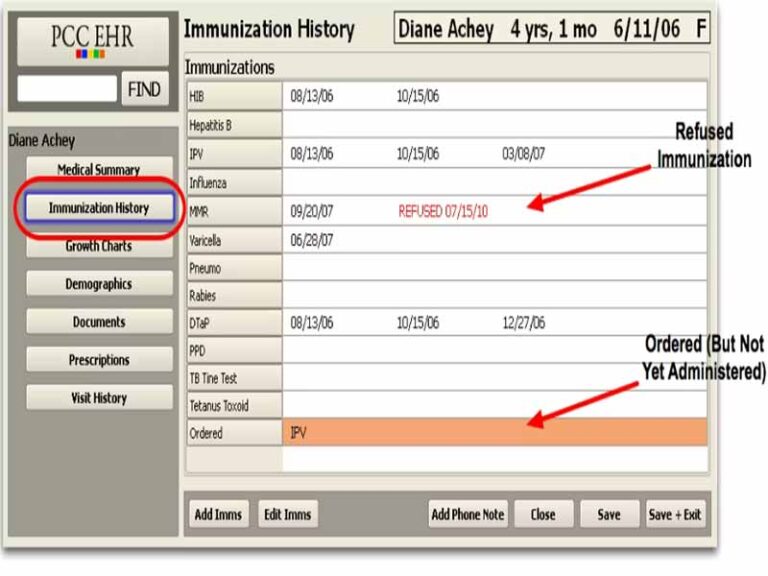


PCC EMR System Specifications
What Is a PCC Medical System?
PCC Software is an intuitive cloud-based solution designed for child-focused medical practices, bringing together charting, scheduling, and billing. PCC schedule supports clinicians by simplifying daily tasks, improving documentation accuracy, and helping teams stay organized. It is built specifically for pediatric care, allowing practices to manage patient records, streamline workflows, and maintain consistent communication, all while keeping the focus on delivering attentive care to young patients and their families.
PCC Software Integrations
There is no information available about the third-party integrations on the official website of this patient software.
What Is PCC In Healthcare Best For?
PCC Pediatric EHR also offers a fully integrated platform that connects front desk operations with clinical and financial processes. It enables practices to handle state registries, appointments, inventory handling, immunization dates, insurance claims, developmental monitoring, clinical documentation, and patient interactions with ease. PCC Connect promotes smoother coordination across staff, reduces administrative burden, and enhances overall effectiveness.
Who Is PCC EMR For?
PCC EHR can be leveraged across all scales of operations of pediatric practices and the following related sectors:
- Independent private practices
- Preventive and developmental care centers
- Pediatric peer learning communities
- Small to large private pediatric groups
- Multi-office pediatric organizations
How Much Is PCC Software Pricing?
PCC cost operates on a single, flat monthly fee. No startup costs, no data conversion charges, no surprise add-ons ever. Everything your pediatric practice needs sits under one predictable number, making it genuinely easy to plan your budget month after month. Connect with the sales team for expense estimations.
How To Use The PCC System?
Add your credentials for a Unique PCC login, then explore the user interface. Follow these instructions for complete utilization:
- Open the schedule to see your daily patient flow at a glance.
- Select a patient to view their specific pediatric growth charts and history.
- Use the vaccine forecaster to identify which immunizations are due or upcoming.
- Pick a specialized template to document the visit quickly and accurately.
- Input vitals directly into the chart to see real-time developmental plotting.
- Review integrated medication history to ensure safe, age-appropriate dosing.
- Send electronic prescriptions to the family’s preferred pharmacy in two clicks.
- Use the mobile app to sign notes or check labs while away from your desk.
- Share visit summaries and educational resources directly to the patient portal.
- Finalize the encounter to trigger the automated billing and coding system.
If you are interested in getting to know about this software better, then book a free PCC demo. Have a better understanding of the performance of this platform in a practice setting through a visual tutorial.
Is PCC Healthcare The Right Choice?
PCC post acute care software is designed to be intuitive so you can stay focused on the child in front of you. This tool organizes your day from the moment a family checks in until the final bill is sent, ensuring nothing slips through the cracks.
Independent pediatricians choose My PCC because it is the only platform built exclusively for their unique clinical needs. This tool removes the burden of general medical software by offering pediatric-specific growth charts, immunization tracking, and age-based screening tools. It focuses on giving you more face time with families, while the dashboard provides instant insights into your practice’s financial and clinical health.
The system scales effortlessly, supporting everything from solo practitioners to large multi-office groups. A PCC extension protects sensitive data with enterprise-grade encryption and secure user authentication, ensuring that patient records remain private as your practice grows. For compliance, it is ONC Health IT Certified and Drummond Certified, meeting strict federal standards for interoperability. The software is also fully HIPAA compliant and has been recognized as “Best in KLAS” for several consecutive years, proving its reliability in the pediatric field. Contact our software experts to clear any doubts and read the unbiased PCC reviews for a third-party perspective.
PCC Software Features
A PCC log in keeps every appointment moving without friction. It is built around real pediatric routines, helping clinicians document visits smoothly while staying engaged with patients. From charting to follow-ups, everything feels intuitive, reducing clicks and keeping attention where it belongs, on care delivery.
This PCC charting system introduces an intelligent scribe that listens during visits and turns conversations into structured notes. This means less typing and more eye contact with families. It supports providers in capturing accurate details while keeping the interaction personal and uninterrupted.
PCC Calendar gives a real-time view of how the practice is performing. With visual summaries of clinical and financial activity it helps teams quickly understand trends, spot gaps, and make confident decisions without digging through complex reports.
A PCC.login simplifies billing and financial processes so nothing slips through the cracks. PCC portal supports claims, coding, and payment tracking while helping practices stay financially stable. Everything is aligned to improve collections and maintain a predictable income flow.
PCC portal log in offers a mobile experience that keeps patient information within reach anytime. Providers can review charts, send prescriptions, update notes, and communicate with families directly from their device, making care more flexible and responsive.
A login PCC software delivers detailed analytics tailored for pediatrics. It tracks measures like immunization rates and visit patterns, allowing practices to compare performance and improve outcomes with clear, actionable data.
See The Software In Action Watch Free Demo!
Top Recommended Software






PCC Software Pros and Cons
Pros
Specialty growth charts, including preemie and Down syndrome plots Integrated vaccine forecaster with direct state registry reporting Practice dashboard compares your metrics to national benchmarks Unlimited personalized training and 24/7 technical support included Secure family portal for easy access to visit notes Modifiable clinical documentation built-in templatesPCC Software Reviews
My software review
Pros
The platform has been a dependable part of our daily operations. It handles core tasks smoothly and keeps everything organized without adding complexity.
Cons
Limited advanced customization options.
An excellent System
Pros
The software offers a good mix of features that support our workflow and improve efficiency. It covers most of our needs, though there are occasional areas where improvements could enhance usability. Still, it delivers solid value for the price.
Cons
Occasional lag in updates or syncing.
Frequently Asked Questions
Certainly not, the PCC EHR software does not have a free plan available.
Yes, PCC healthcare software is cloud-based.
English is the language that PCC pediatric EHR software supports.
The PCC system allows buyers to get answers through phone support, fax assistance, and email. You can also get details about the PCC software pricing.
There is a PCC software app that provides remote access for managing clinical documentation. Users can access the functionalities of this software platform through a single PCC login.
No, the PCC API is unavailable.
According to PCC software reviews, this pediatric practice management software supports iOS and Android handheld devices, with a requirement for a PCC log in to access the user interface.
No, PCC patient software does not typically offer a standard free trial, but you can request a free demo to see the software in action.
