

Overview
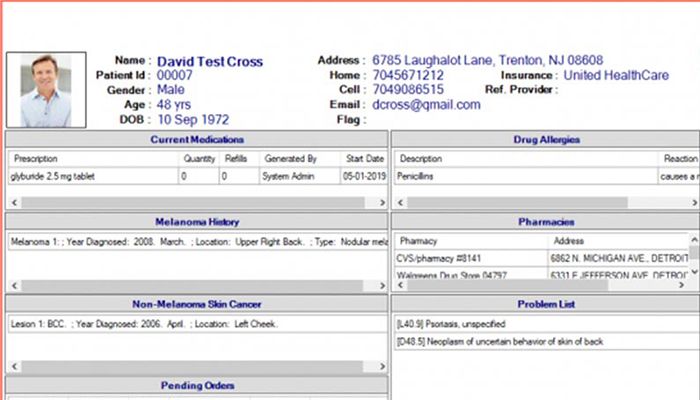
Encite is an EHR system for modern healthcare practices, considering the advanced and automated features. This healthcare software solution specializes in optimizing core managerial operations such as clinical documentation. Practices are empowered with robust documentation features that are highly customizable according to the specialties. With these personalizations, practices can be managed accurately and conveniently.
Encite Specifications
What Is Encite Software?
Encite is an intuitive, user-friendly cloud-based EHR platform that can cut the burden of clinical, administrative, and operational management. The modifiable and adaptable documentation feature allows practitioners to tailor their workflows according to their work style and specialty demands. Furthermore, this system makes data accessible, leading to better patient satisfaction rates. This EHR automates workflows through robust features, which include RCM, electronic prescribing, and other practice management capabilities.
What Is Encite EHR Best Known For?
Encite was built with a simple goal: create healthcare software that works the way clinicians think. Instead of relying on rigid templates, Encite was designed from the provider’s point of view, giving users the freedom to document and manage care without clicking through endless screens. Its EHR mirrors real clinical workflows, making it easy to navigate, customize, and use without technical skills. The system adapts to each provider’s style, offering a smooth, flexible experience that supports faster charting, clearer information access, and more efficient patient care.
Encite Pricing
Encite cost depends on the scale of operations, specialty types, user preferences, and other practice requirements. Get in contact with the sales team by clicking on the ‘Get Pricing’ option and get a tailored pricing quote.
Encite Integrations
This platform does integrate with other systems, but the details have not been provided on the official website.
Who Are Encite System Users?
All scales of operation of healthcare practices can leverage this system. The specialties, which benefit from this platform, are:
- Primary Care
- Dermatology
- Otolaryngology
- Internal Medicine
- Pediatrics
- Vein & Vascular
How Does the Encite System Work?
After installation, add your unique credentials for an authorized Encite login and navigate to the intuitive dashboard for exploration. You can document patient consultation sessions and access data feasibly. The interface is highly modifiable, which guarantees maximum workflow optimization. Data exchange is very convenient through its interoperable features, which are crucial for making informed clinical decisions. Moreover, electronic prescription and notes dictation capabilities.
You can request a complimentary Encite demo to learn more about its features.
Why Choose Encite EHR?
Encite is built for healthcare teams that need software able to match their own workflow, not force them into rigid templates. Instead of using older, fixed systems, Encite gives providers the freedom to document, schedule, bill, and manage care in a way that fits their daily routine. Every tool is designed with input from clinicians and industry experts, allowing the platform to grow around the user’s needs rather than slow them down.
This scalable software is created entirely for healthcare information management, supported by leading HIT partners who help maintain an open, modern architecture. This ensures the system stays fast, secure, and compatible with other applications you rely on. Whether your team needs flexible charting, connected e-prescribing, integrated billing, or smoother front-office management, the platform adapts without requiring a complicated setup.
Encite Features
E n c i t e e-Prescribing tool lets providers send medications electronically to retail or mail-order pharmacies through the Surescripts network. Its clean layout makes it easy to use with almost no training. Prescriptions are sent quickly and securely, helping reduce errors and saving time for both providers and pharmacies.
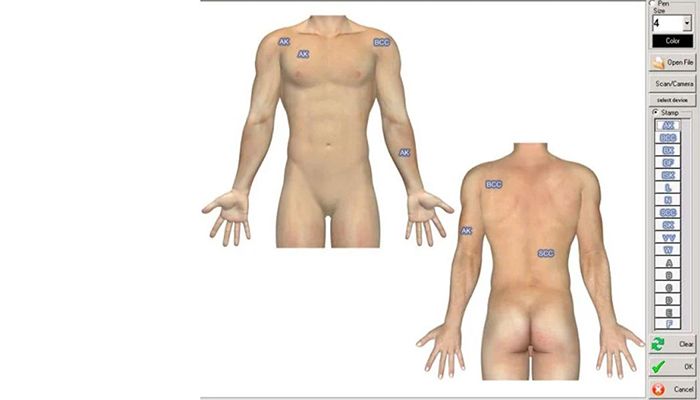
Encite EHR uses the Rapid Chart feature to create visit notes with only a few keystrokes. Because it is not template-based, clinicians can customize workflows on the spot and document in a way that fits their style. The system supports secure data exchange, integrates with other healthcare tools, and allows voice dictation for faster charting.
This Practice Management streamlines the front desk and billing operations so practices can work more efficiently. It helps manage appointments, insurance checks, registrations, documents, and billing tasks in one system. The workflow is designed to speed up payments, reduce errors, and give staff more time to focus on patient care.
Scheduling tools let staff view multiple providers and locations from one screen. Teams can book the next available slot with one click, manage conflicts, and adjust schedules easily. Automated mobile reminders help reduce no-shows and fill cancellations quickly, keeping the calendar full and organized.
Real-time eligibility checks help the office confirm insurance details instantly or in batches before visits. Patient registration tools make it easy to collect demographics, manage referrals, and capture payments at check-in. Staff can also access key documents and insurance cards within seconds.
Its RCM service helps practices improve cash flow by submitting claims, managing denials, reducing errors, and tracking revenue performance. The team follows regulatory guidelines and provides monthly reports so practices always know where they stand. E n c i t e only bills after collections occur, giving practices confidence that every claim is handled with care.
See The Software In Action Watch Free Demo!
Top Recommended Software






Encite Pros and Cons
Encite Reviews
Admin
Pros
Easy to use with a flexible workflow, strong content, and reliable support.
Cons
Would be better with an online knowledge base.
Generic EHR
Pros
This EHR does a great job of organizing data and was the first system we used to move away from paper charts.
Cons
The version we are using still feels quite basic and does not fully meet our specific needs.
My software review
Pros
The platform has been a dependable part of our daily operations. It handles core tasks smoothly and keeps everything organized without adding complexity.
Cons
Limited advanced customization options.
Frequently Asked Questions (FAQs)
A: Certainly not, the Encite EHR system does not have a free plan available.
A: Yes, the Encite is cloud-based.
A: English is the language that the EMR Encite supports.
A: The Encite EHR platform allows buyers to get answers through the support portal and email. You can also get details about the Encite cost.
A: There is an Encite app that provides remote convenience for scheduling and e-prescribing. Users can access the functionalities of this software platform through a single Encite login.
A: Yes, the E n c i t e API is available.
A: Certainly, iOS and Android handheld devices are supported by this practice management software, with a requirement for Encite login to access the dashboard.
A: No, there is no Encite free trial option, but you can also request a free E n c i t e demo.
A: The integration capabilities are not yet mentioned by the vendors on the official website.
