Best Notes eMAR
A BestNotes login allows active medication monitoring and managed inventory for optimal client experience. Users can also maintain better medication records and perform precise prescribing with this tool.



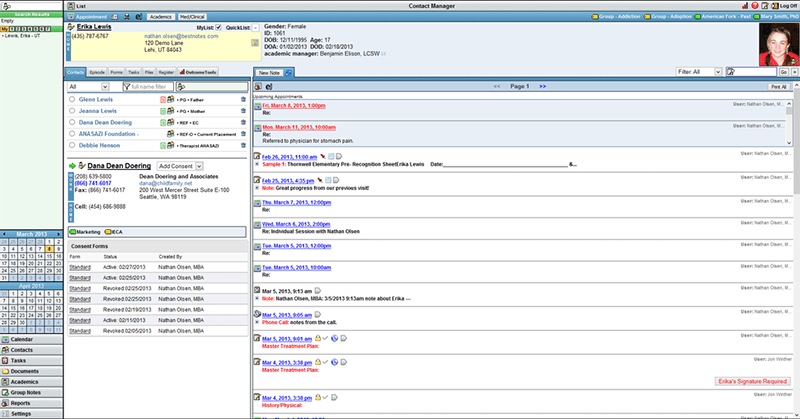
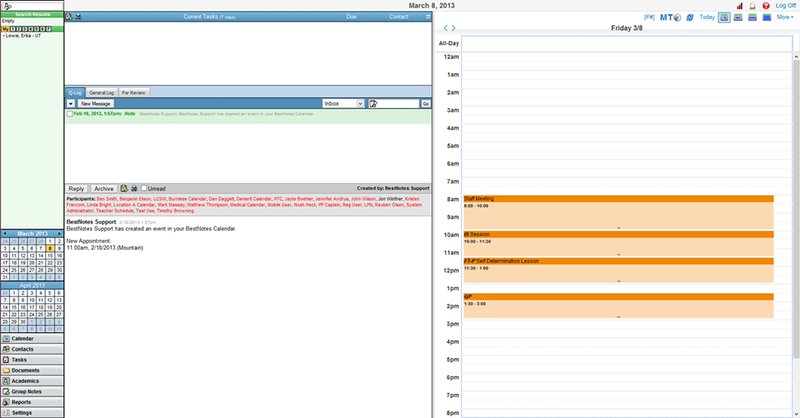
Explore what BestNotes offers — from day-to-day workflows to advanced capabilities.
A BestNotes login allows active medication monitoring and managed inventory for optimal client experience. Users can also maintain better medication records and perform precise prescribing with this tool.
Best Note CRM tools organize all communications from diverse means and automate notifications for staff and patients. These tools nurture leads, provide insights, monitor referral sources, record conversion rates, etc., after a BestNotes login.
BestNote enables remote therapy or grouped sessions through secure virtual consultation sessions. Patients can share data, receive reminders, join from any device, share screens, and receive care services with optimal visual and audio quality.
Therapists can share and create evaluations and surveys electronically with modifiable templates. BestNotes app allows active tracking of your business and patients and industrial trend recognition, so nothing slips through the cracks.
These calendars make billing, appointment scheduling, attendance monitoring, and venue booking comprehensive.
A BestNotes login helps users in effortless note-keeping through ambient dictation and listening, and manually reviewed editing.
BestNotes EMR is an intuitive web-based behavioral health CRM, eMAR, and EHR system that optimizes your administrative workflows and clinical operations like an expert. This system revolutionizes documentation with active tracking, a comprehensive calendar view, and enhances patient satisfaction rates with robust online portals.
Third-party apps and tools integrations are supported by the Best Notes software solution, which includes:
BestNotes download is best for:
BestNotes cost is flexible and depends on user volume with a $100 setup fee, which can include:
Connect with us for a custom quote.
Note: The pricing can change over time.
The following can download BestNotes and leverage it to the fullest:
You can choose to Best Notes download based on these offerings:
Connect with our client support team to have all your software queries answered. You can also watch a free demo and read unbiased BestNotes reviews.
The platform has been a dependable part of our daily operations. It handles core tasks smoothly and keeps everything organized without adding complexity.
Limited advanced customization options.
The software offers a good mix of features that support our workflow and improve efficiency. It covers most of our needs, though there are occasional areas where improvements could enhance usability. Still, it delivers solid value for the price.
Occasional lag in updates or syncing.
Certainly not, the CRM BestNotes software does not have a free plan available.
Yes, Best Notes CRM is cloud-based.
English is the language that BestNotes supports.
Best Notes EHR allows buyers to get answers through the phone, the assistance portal, and email. You can also get details about the BestNotes pricing.
There is a BestNote mobile app that provides remote access for CRM, EHR, and eMAR tools. Users can access the functionalities of this software platform through a single BestNotes login.
Yes, the BestNote API is available.
According to BestNotes reviews, this eMAR software supports iOS and Android handheld devices, with a requirement for a BestNotes login to access the dashboard.
There is no Best Note free trial option, but you can request a free demo.
Indeed, the apps BestNotes eMAR integrates with are Twilio, Kno2, Videra Health, Claim MD, ASAM Continuum, Elkay, etc.
Tell us a little about how your practice runs, and a specialist will come back with concrete numbers, a quick read on whether BestNotes genuinely fits, and a couple of closely-matched options worth weighing up. Straight answers, no sales pressure.
Takes under a minute — we never share your details.
By providing your phone number to Codatis, you consent to receive SMS communications related to your inquiries, service updates, and direct communication with your assigned representative.
Message and data rates may apply in accordance with your mobile service provider.
Codatis does not send unsolicited promotional messages. For more information, please refer to our Privacy Policy below or visit the link provided.
Codatis respects your privacy. No mobile information will be shared with third parties or affiliates for marketing or promotional purposes.
Text messaging opt-in data, consent, and related information will not be shared with any third parties under any circumstances.